⚡️zt — A pure-Zig terminal emulator. 5.6ms startup, 73 MB/s throughput, 2 MB memory

Hey everyone — first post here. I’ve been lurking for a while and learning a lot from the discussions. Figured it was time to share what I’ve been working on and get some feedback from people who actually know Zig well.

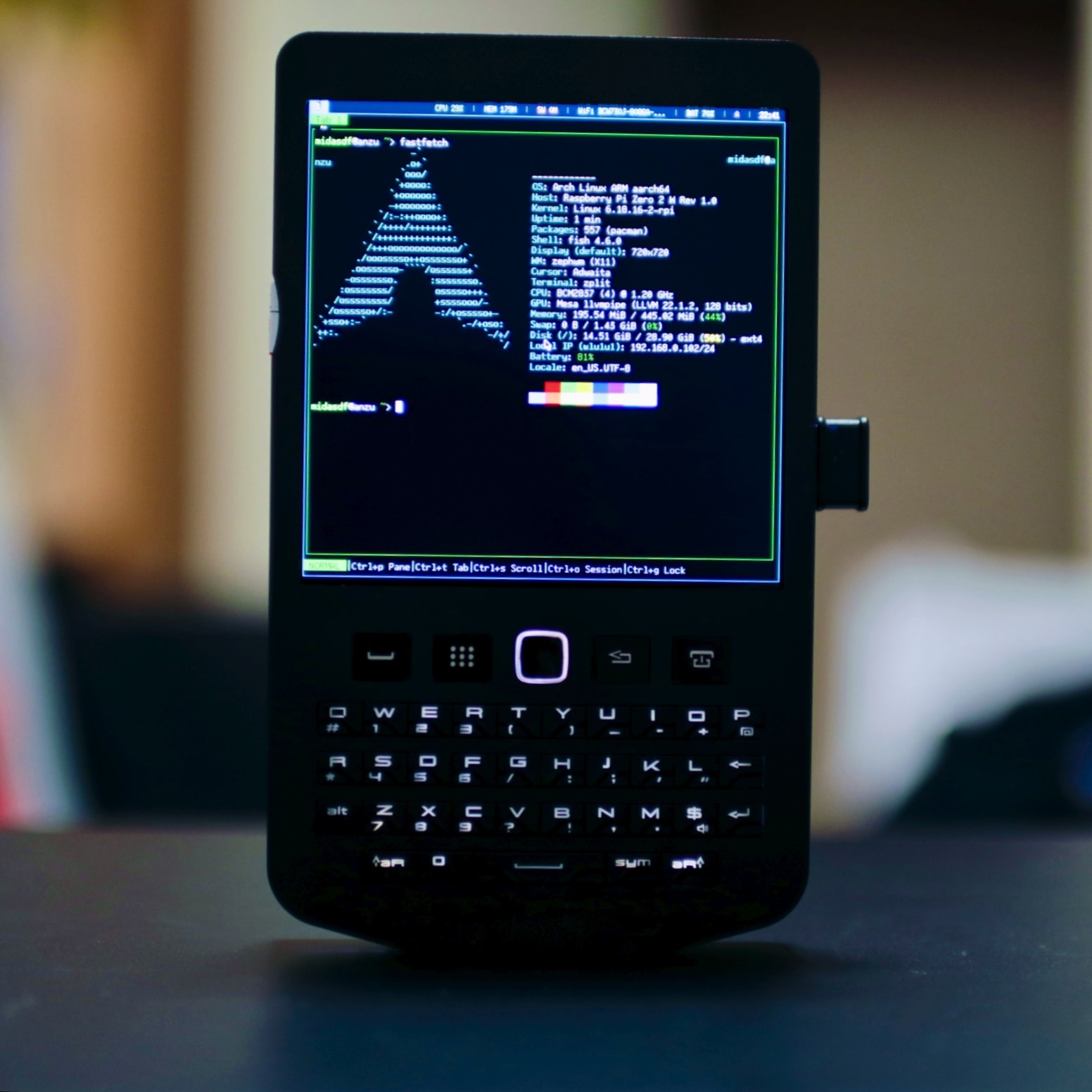
zt is a terminal emulator I wrote from scratch in Zig. The original goal was to have a usable terminal on a HackberryPi Zero (RPi Zero 2W, 512 MB RAM, 720×720 display) without needing X11 or Wayland. It ended up becoming a more general-purpose terminal that also runs on X11, Wayland, and experimentally on macOS.

GitHub: GitHub - midasdf/zt: ⚡zt — the fastest terminal emulator. 73 MB/s throughput. 5.6ms startup. 2MB memory. Pure Zig. · GitHub

Some numbers

Measured on an i5-12450H under X11 (-Doptimize=ReleaseFast):

zt Ghostty Alacritty st
Startup 5.6ms 492ms 136ms 52ms
Throughput (dense ASCII) 73 MB/s 7 MB/s 19 MB/s 27 MB/s
Idle memory (PSS) 2.2 MB 96 MB 35 MB 15 MB

Full benchmark suite and methodology: GitHub - midasdf/zt-bench: Benchmark suite and results for zt terminal emulator · GitHub

Zig-specific things that might be interesting

Comptime backend selection — zt has four backends (framebuffer, X11, Wayland, macOS), but the backend is chosen at comptime via -Dbackend=x11. The compiler eliminates all code paths for unused backends. Same for font data, pixel scale, keyboard layout, and shell path. There’s no runtime config file — you edit config.zig and rebuild (st-style). This means the binary contains exactly what you need and nothing else.

No libc on fbdev — The framebuffer backend uses only std.posix syscalls. No libc, no dynamic linking. The result is a fully static binary that runs on a bare Linux console.

Pure Zig Wayland client — The Wayland backend implements the wire protocol directly without libwayland-client. It handles xdg-shell, wl_shm, text-input-v3 (IME), clipboard (wl_data_device + primary selection), xdg-decoration, and wp_cursor_shape. Only libxkbcommon is linked for keyboard layout support.

SIMD in the VT parser — The bulk ASCII fast path uses @Vector(16, u8) for range checking. Instead of branching per byte, it loads 16 bytes, does a vector comparison against the 0x20–0x7E printable range, and writes directly to the cell array. Dirty regions are marked per-range rather than per-cell.

Row-map scrolling — Instead of memmove-ing the entire cell buffer on scroll, zt uses an indirection table (row map). Scrolling is O(1) — just rotate the row pointers and mark the recycled row dirty. At 60K scrolls, this moves 44 MB of pointers instead of 880 MB of cell data.

What it doesn’t do (yet)

To be upfront about current limitations:

  • No scrollback buffer (planned)
  • No sixel/image protocol support
  • No ligatures (bitmap font only — 59K glyphs are embedded in the binary)
  • macOS backend is untested on real hardware (written via objc_msgSend from Zig, without a Mac)
  • No mouse reporting yet

Build

zig build -Dbackend=x11 -Doptimize=ReleaseFast

Requires Zig 0.15+. Builds in under a second. Cross-compilation to aarch64 works with -Dtarget=aarch64-linux.


I’d appreciate any feedback — on the code, the architecture, the Zig patterns, or anything else. I’m sure there are things I’m doing in non-idiomatic ways. The codebase is ~10K lines across 19 files, so it should be fairly readable.

Thanks for having me here.

12 Likes

IMHO: just skip sixels (it’s awful for realtime updates as soon as color is involved), and go straight to kitty graphics protocol…

PS: I get a couple of compile errors on macOS with zig 0.15.2, building via zig build -Dbackend=macos -Dshell=/bin/zsh -Doptimize=ReleaseFast:

src/backend/macos.zig:381:83: error: pointer type '*anyopaque' does not allow address zero
        msgSend_void_id(window, sel("makeKeyAndOrderFront:"), @as(id, @ptrFromInt(0)));

…and

src/backend/macos.zig:584:54: error: @ptrCast discards const qualifier
    _ = class_addMethod(new_class, sel("drawRect:"), @ptrCast(&ztDrawRect), "v@:{CGRect=dddd}");
                                                     ^~~~~~~~~~~~~~~~~~~~~

(how do you even write macOS specific code without being able to test it, AFAIK Zig also doesn’t support cross-compiling UI applications to macOS right?)

PPS: ah, I see :wink: (you should probably add a vibecoding disclaimer)

image

6 Likes

▎ Thanks for the feedback!

▎ Sixel vs kitty graphics: Good call — I’ve been leaning that way too.
Sixel’s color handling is painful, and kitty’s protocol is just better
designed overall. I’ll probably go straight to kitty graphics when I get to
image support.

▎ macOS errors: You’re absolutely right, and I appreciate you trying to build
it. The macOS backend is entirely vibe-coded — I don’t own a Mac, so I’ve
never been able to test it on real hardware. Those @ptrFromInt(0) and
@ptrCast const issues are exactly the kind of things that slip through
without actual compilation. I’ll get those fixed.

▎ Vibecoding disclaimer: Ha, fair point. Yeah, the macOS backend is 100%
AI-assisted with zero real-device testing — I should definitely make that
clear in the README. The Linux backends (X11, Wayland, fbdev) are the ones I
actually develop and test on daily.

Hey, welcome to Ziggit! Sorry about the hiccup, you caught us at a weird time.

Speaking of which, it’s never been easier to over-promise and under-deliver. Saying you have a backend which doesn’t even compile does lead one to wonder about the rest of it.

A project is never quite so “blazing fast” as right before it implements all the hard stuff. That’s what eats the cycles.

This, on the other hand, is helpful. It scopes the project and demonstrates motive. I’d like to hear more about that: why did you write it? Are there reasons someone else would use it? What’s the scope, what’s the goal? How’s conformance?

Is it going to be around in five years?

If you give us a reason to look through ten thousand lines of code, some of us are likely to do it.

3 Likes

Seems to segfault on wayland. The heavy LLM looking codebase does not really boost my confidence much either. I wanted to confirm the benchmark results.

5 Likes

Thanks for reopening this — I’d assumed it was gone for good when it got hidden, so I’m glad to have another chance. Sorry for the late reply; timezone difference meant I didn’t notice right away.

I also want to apologize for the tone of my original post. Ziggit is a place where serious Zig developers share their work, and I came in a bit too eager without enough context. I’m not an experienced Zig programmer — I’m more of a hands-on hardware tinkerer who reached for Zig (with the help of AI tools) because it fit the constraints I was working with.

■Why I built it

I daily-drive a HackberryPi Zero — a Raspberry Pi Zero 2W with 512MB RAM and a 720×720 display in a handheld case. On that hardware, every megabyte matters. i3 alone pulls in GLib, pango, cairo and eats 33MB. zellij is 44MB. Even terminals that people consider lightweight were too much when you’re sharing 512MB with everything else.

So I built zt to have a usable terminal on that device, originally framebuffer-only. Then I added an X11 backend so I could use it alongside a window manager. It’s been my actual daily terminal for months now.

I also ended up writing an i3-compatible window manager and a terminal multiplexer for the same reason — the standard tools were just too heavy for this hardware. The whole stack runs under 6MB.

■Scope and goals

zt is intentionally a small, opinionated terminal. The goal is not to compete with kitty or ghostty on features. It’s to be a fast, low-overhead terminal that works on constrained hardware without a GPU or a modern desktop stack.

Compile-time config via config.zig, st-style. No plugin system, no image protocols, no tabs. What it does cover: xterm-256color + 24-bit TrueColor, CJK wide characters, SGR attributes, alternate screen, OSC 52/OSC 8, bracketed paste, styled underlines. 73 unit tests across 7 modules.

■Fair criticism on the backends

You’re right that I was overreaching. Wayland and macOS backends were me being greedy — I don’t have a Mac, and I rarely use Wayland on this device. Framebuffer and X11 are the backends I actually use daily and those are stable. I should have been upfront about that instead of listing four backends like they’re all equal.

■Is it going to be around in five years?

I honestly can’t promise that. What I can say is that it’s the terminal I use every day on hardware I carry with me, so I have a strong personal incentive to keep it working.

■A question for the community

I personally think there’s value in having a lightweight, GPU-free terminal as an option, even if it’s niche. Curious whether others here see a place for that, or if the consensus is that existing options already cover this space well enough.

Thanks for taking the time to engage — I appreciate the honest feedback.

1 Like

I wish you’d take the time to at least write your posts with your own hands

6 Likes

申し訳ありません。英語非ネイティブなため、技術的な説明が確信を持って行えず翻訳を機械で行いました。
原文はこちらです。

再開していただきありがとうございます。非表示になった時点で完全に削除されたと思っていたので、また機会をいただけて嬉しいです。返信が遅くなり申し訳ありません。時差の関係で、すぐに気づきませんでした。

また、最初の投稿の口調についても謝罪いたします。Ziggitは、真剣なZig開発者が作品を共有する場であり、十分な背景説明なしに、少し性急な投稿をしてしまいました。私は経験豊富なZigプログラマーではなく、どちらかというとハードウェアをいじるのが好きな人間で、Zig(AIツールも活用)が自分の作業環境の制約に合致していたため、採用しました。

■開発理由

私は普段、HackberryPi Zero(Raspberry Pi Zero 2W、RAM 512MB、ディスプレイ 720×720)をハンドヘルドケースに入れて使っています。このハードウェアでは、1MBでも無駄にできません。i3だけでもGLib、pango、cairoを読み込むのに33MB、zellijは44MBも消費します。 一般的に軽量とされるターミナルでさえ、512MBのメモリを他のアプリケーションと共有している状況では重すぎました。

そこで、そのデバイスで使えるターミナルとしてztを開発しました。当初はフレームバッファのみでしたが、その後X11バックエンドを追加し、ウィンドウマネージャと併用できるようにしました。今では数ヶ月間、私の日常的なターミナルとして使っています。

同じ理由で、i3互換のウィンドウマネージャとターミナルマルチプレクサも開発しました。標準ツールではこのハードウェアには重すぎたのです。スタック全体で6MB未満で動作します。

■スコープと目標

ztは意図的に小型で、独自の考えを持つターミナルです。機能面でkittyやghosttyと競合するものではありません。GPUや最新のデスクトップ環境を持たない、制約のあるハードウェア上で動作する、高速でオーバーヘッドの少ないターミナルを目指しています。

コンパイル時の設定はconfig.zig(stスタイル)で行います。プラグインシステム、イメージプロトコル、タブは使用しません。 対応機能:xterm-256色+24ビットTrueColor、CJKワイド文字、SGR属性、代替画面、OSC 52/OSC 8、括弧付きペースト、スタイル付き下線。7つのモジュールにわたる73個のユニットテスト。

■バックエンドに関する正当な批判

ご指摘の通り、私は欲張りすぎました。WaylandとmacOSバックエンドは欲張りすぎでした。私はMacを持っていませんし、このデバイスでWaylandを使うこともほとんどありません。私が実際に毎日使っているのはFramebufferとX11で、これらは安定しています。4つのバックエンドを同等に扱うのではなく、その点を正直に伝えるべきでした。

■5年後も使えるでしょうか?

正直なところ、それは約束できません。ただ、これは私が毎日持ち歩いているハードウェアで使っているターミナルなので、個人的には動作させ続ける強い動機があります。

■コミュニティへの質問

個人的には、ニッチなニーズであっても、軽量でGPU非搭載のターミナルが選択肢として存在することには価値があると考えています。皆さんはどう思われますか?それとも、既存の選択肢で既にこの分野は十分にカバーされているという意見が多いのでしょうか?

ご意見をお寄せいただきありがとうございます。率直なご意見をお待ちしています。

3 Likes

WaylandはKDEを入れて試してみましたが、いろいろ修正が必要なことがわかりました。Macはもしお金に余裕ができたらMacBook Neoを買ってみようと思います。

I tried Wayland with KDE. I found many things to fix. Mac support, maybe I will buy a MacBook Neo if I can save enough money someday.

日本語はシンプル会話くらいに話します⋯
変な文法だとしたら、すみません

build.zigでJPキーボードのプションを見てから、英語を話していない人かなって思いました、無礼な返事はすみません。

ZigコミュニティにLLMは確かに賛否両論です、人それぞれに意見があります。LLMツールを使用する場合は、その使用方法について免責条項を明記すべきであるという点については、おおむね合意があります。

LLMで作った機能が多数あるにもかかわらず動作しない上に、寄付をお願いしていることは、人々から否定的な反応になっています。

優れたソフトウェアの望みがよくわかっています。特に低スペックのハードウェア上で動作させる場合には、それが不可欠です。LLMコードに依存度を下ると、さらに優れたソフトウェアを実現することができると思います。

機能しない機能は宣伝しないことをお勧めします。テストできない機能は開発すべきではありません。テスト可能な部分を高品質に仕上げに集中ほうがいいだと思います。プロジェクトがうまくいったら、人々は喜んで協力してくれるでしょう。

2 Likes

日本語で返信をいただけて驚きました。

正直におっしゃってくださったおかげで、自分が宣伝に前のめりになっていたことに気づけました。ありがとうございます。

いただいたアドバイスをもとに、READMEを整理しました。動かない機能の宣伝をやめて、各バックエンドの状態を正直に書きました。LLMの免責事項も追加しました。寄付のリンクも外しました。まだその段階ではないと思います。

テストできる部分の品質を上げることに集中します。

I was surprised to get Japanese.

Thank you for being honest with me. You helped me see that I was trying too hard to promote.

I changed the README. I removed untested features from the top. I wrote the real status of each backend. I added a note about LLM use. I also removed donation links. It is too early for that.

I want to make the working parts better first.

6 Likes


This is the device I am trying to make comfortable to use.

10 Likes

That’s good context to have, seems like a worthwhile project.

2 Likes