Zig's new reader interface is confusing

For context I come from a background of mainly Rust development and intermittent C development. If I have a file that I would like to open, assuming the file will be of an unknown size, what is the new most optimal way to read the entire contents of the file so that I can use it later? For example if i have a file “text.txt” containing:

Zig 0.15.1 !!

How can I read the entire contents of the file and store them In a const u8 buffer for later use?

You can use this function

pub fn readFile(gpa: std.mem.Allocator, file_path: []const u8) ![]u8 {
    const file = try std.fs.cwd().openFile(file_path, .{});
    var reader = file.reader(&.{});
    return reader.interface.allocRemaining(gpa, .unlimited);
}

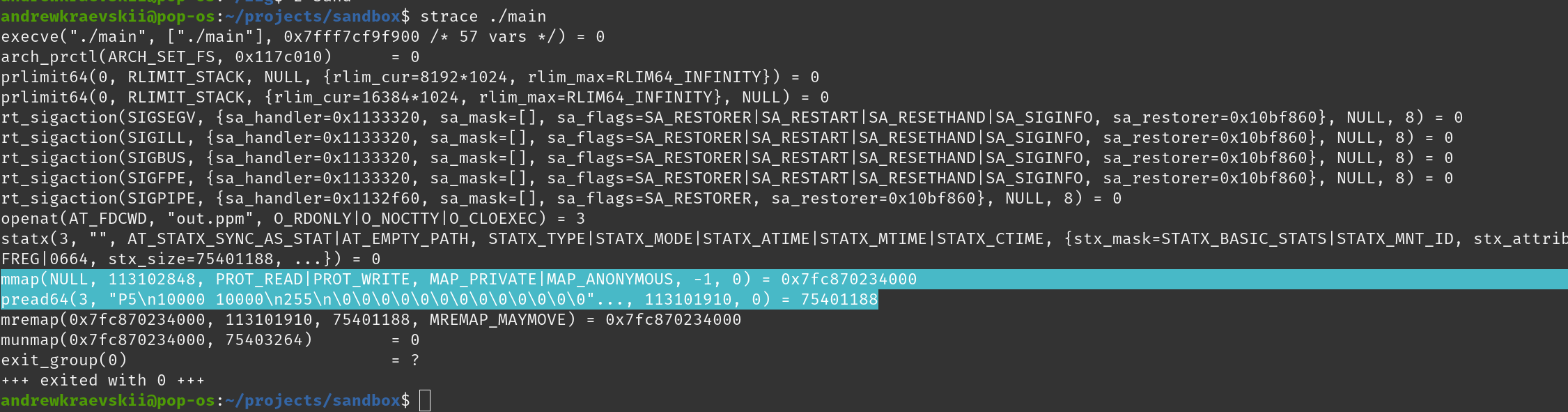
This is optimal and will calculate size of a buffer before reading entire file into it in one syscall.
Here is relevant code which will be called when all layers of writer/reader abstractions removed. zig/lib/std/Io/Writer.zig at f90510b081e06449ab0bd97a1254c78f5be6a8d4 · ziglang/zig · GitHub

As we can see it does exactly correct number of syscalls

2 Likes

wouldn’t you need to call:

defer file.close()

after opening the file? Also what does the reader use the buffer you pass to it for? is it some sort of intermediary storage for the data being currently read?

Yep I forgot.

Reader uses buffer to allow you to read small values like bytes and structs while still not making virtual function calls. Since we never use such functions buffering is unnecessary which is why we provide empty buffer.

2 Likes

Oh that clarifies things. thank you!

Why re-implement std.fs.Dir.readFileAlloc?

7 Likes

You probably wanted to link master std.fs.Dir.readFileAlloc, because on 0.15.1:

pub fn readFileAlloc(self: Dir, allocator: mem.Allocator, file_path: []const u8, max_bytes: usize) ![]u8 {
    return self.readFileAllocOptions(allocator, file_path, max_bytes, null, .of(u8), null);
}

pub fn readFileAllocOptions(
    self: Dir,
    allocator: mem.Allocator,
    file_path: []const u8,
    max_bytes: usize,
    size_hint: ?usize,
    comptime alignment: std.mem.Alignment,
    comptime optional_sentinel: ?u8,
) !(if (optional_sentinel) |s| [:s]align(alignment.toByteUnits()) u8 else []align(alignment.toByteUnits()) u8) {
    var file = try self.openFile(file_path, .{});
    defer file.close();

    // If the file size doesn't fit a usize it'll be certainly greater than
    // `max_bytes`
    const stat_size = size_hint orelse std.math.cast(usize, try file.getEndPos()) orelse
        return error.FileTooBig;

    return file.readToEndAllocOptions(allocator, max_bytes, stat_size, alignment, optional_sentinel);
}

// https://ziglang.org/documentation/0.15.1/std/#src/std/fs/File.zig
/// Deprecated in favor of `Reader`.
pub fn readToEndAllocOptions(
    self: File,
    allocator: Allocator,
    max_bytes: usize,
    size_hint: ?usize,
    comptime alignment: Alignment,
    comptime optional_sentinel: ?u8,
) !(if (optional_sentinel) |s| [:s]align(alignment.toByteUnits()) u8 else []align(alignment.toByteUnits()) u8) {
    // If no size hint is provided fall back to the size=0 code path
    const size = size_hint orelse 0;

    // The file size returned by stat is used as hint to set the buffer
    // size. If the reported size is zero, as it happens on Linux for files
    // in /proc, a small buffer is allocated instead.
    const initial_cap = @min((if (size > 0) size else 1024), max_bytes) + @intFromBool(optional_sentinel != null);
    var array_list = try std.array_list.AlignedManaged(u8, alignment).initCapacity(allocator, initial_cap);
    defer array_list.deinit();

    self.deprecatedReader().readAllArrayListAligned(alignment, &array_list, max_bytes) catch |err| switch (err) {
        error.StreamTooLong => return error.FileTooBig,
        else => |e| return e,
    };

    if (optional_sentinel) |sentinel| {
        return try array_list.toOwnedSliceSentinel(sentinel);
    } else {
        return try array_list.toOwnedSlice();
    }
}

and on master:

pub fn readFileAlloc(
    dir: Dir,
    /// On Windows, should be encoded as [WTF-8](https://simonsapin.github.io/wtf-8/).
    /// On WASI, should be encoded as valid UTF-8.
    /// On other platforms, an opaque sequence of bytes with no particular encoding.
    sub_path: []const u8,
    /// Used to allocate the result.
    gpa: Allocator,
    /// If reached or exceeded, `error.StreamTooLong` is returned instead.
    limit: std.Io.Limit,
) ReadFileAllocError![]u8 {
    return readFileAllocOptions(dir, sub_path, gpa, limit, .of(u8), null);
}
pub fn readFileAllocOptions(
    dir: Dir,
    /// On Windows, should be encoded as [WTF-8](https://simonsapin.github.io/wtf-8/).
    /// On WASI, should be encoded as valid UTF-8.
    /// On other platforms, an opaque sequence of bytes with no particular encoding.
    sub_path: []const u8,
    /// Used to allocate the result.
    gpa: Allocator,
    /// If reached or exceeded, `error.StreamTooLong` is returned instead.
    limit: std.Io.Limit,
    comptime alignment: std.mem.Alignment,
    comptime sentinel: ?u8,
) ReadFileAllocError!(if (sentinel) |s| [:s]align(alignment.toByteUnits()) u8 else []align(alignment.toByteUnits()) u8) {
    var file = try dir.openFile(sub_path, .{});
    defer file.close();
    var file_reader = file.reader(&.{});
    return file_reader.interface.allocRemainingAlignedSentinel(gpa, limit, alignment, sentinel) catch |err| switch (err) {
        error.ReadFailed => return file_reader.err.?,
        error.OutOfMemory, error.StreamTooLong => |e| return e,
    };
}
2 Likes

Maybe “.unlimited” is too expensive…
Are there any ways to get the File Size?

It is definitely too expensive. I used .unlimited just for example sake since OP didn’t provide they knew max file size before hand. But obviously if you know you should limit it.

Not sure what you mean by this. std.fs.Dir.readFileAlloc calculates file size internally to limit reading too large files and to allocate exactly correct number of bytes. What other cases you need to know file size? Maybe to prefix packet which sends file with packet length :thinking:

The last parameter of std.fs.Dir.readFileAlloc is “max_bytes”, and how to define its value? Maybe some files are very small, and others are very large.

I remember, in other programming languages, such as C#, Java, when a file is read, the Max Bytes or Buffer Size is not required…

std.fs.Dir.readFileAlloc() reads up to the file size or the max limit. The last parameter of std.fs.Dir.readFileAlloc() is the max limit. It is to prevent run away reading of huge files that exhausts all memory in the system.

BTW, for the .streaming case, here’s where the file size is obtained. zig/lib/std/Io/Writer.zig at master · ziglang/zig · GitHub

It is merely an upper limit sanity check.
Any value that is sufficiently large enough to read data you are expecting and/or the constraints of the system will suffice.

Yes.
But I still think it is a waste of memory to allocate a large buffer to read a small file…

It doesn’t allocate max size for a file that is way smaller, it internally grows a buffer on demand while reading the file. So you may have some (amortized) reallocations of the internal buffer, which is why the documentation states that:

If the file size is already known, a better alternative is to initialize a File.Reader.

For example you could use std.fs.File.Reader.initSize and pass it a buffer that is big enough (for example by allocating that buffer based on the file size).

To be clear, this is not the size of the buffer that gets allocated, it is only the maximum size that the buffer can grow to. This is what I meant that is just a sanity check. You are solely specifying the upper limit, not allocating.

This is directly from the source code of the that function to get the initial capacity of the buffer:

const initial_cap = @min((if (size > 0) size else 1024), max_bytes) + @intFromBool(optional_sentinel != null);

Whether you pass in 1KB or 64GB, the initial buffer both allocates and grows at the same rate. If you use a small max_size then it will defer to that, but otherwise 1KB is your typical initial buffer size.

As an aside, it is a good idea to get into the habit of checking the source code of stdlib functions that you have questions about. Unlike other languages that have it compiled as a binary, Zig’s stdlib is plain Zig code that you can peruse and jump to with your LSP like any other function. Often the answer is evident with a simple go-to-definition on something you may be unsure of. I have often found this quite helpful.

4 Likes

Thanks for your reply!

Got it, and thanks for your reply!