@Vector memory layout

Hello all,

[EDIT]
Link to repo
Commit: 6d9e380851d327844596bad644f2e5d5ab5e3ad5 for future reference.

Context

I’m trying to render a rectangle by following the Vulkan Guide - Mesh Buffers tutorial, and in the mesh buffer section there is a Vertex struct that I defined as:

pub const Vertex = struct {
    position: @Vector(3, f32),
    uv_x: f32,
    normal: @Vector(3, f32),
    uv_y: f32,
    color: @Vector(4, f32),
};

Then I upload the following vertices and indices:

const rect_vertices: [4]Vertex = .{
    .{
        .position = .{ 0.5, -0.5, 0.0 },
        .uv_x = 0.0,
        .normal = .{ 0.0, 0.0, 0.0 },
        .uv_y = 0.0,
        .color = .{ 0.0, 0.0, 0.0, 1.0 },
    },
    .{
        .position = .{ 0.5, 0.5, 0.0 },
        .uv_x = 0.0,
        .normal = .{ 0.0, 0.0, 0.0 },
        .uv_y = 0.0,
        .color = .{ 0.5, 0.5, 0.5, 1.0 },
    },
    .{
        .position = .{ -0.5, -0.5, 0.0 },
        .uv_x = 0.0,
        .normal = .{ 0.0, 0.0, 0.0 },
        .uv_y = 0.0,
        .color = .{ 1.0, 0.0, 0.0, 1.0 },
    },
    .{
        .position = .{ -0.5, 0.5, 0.0 },
        .uv_x = 0.0,
        .normal = .{ 0.0, 0.0, 0.0 },
        .uv_y = 0.0,
        .color = .{ 0.0, 1.0, 0.0, 1.0 },
    },
};

const rect_indices: [6]u32 = .{ 0, 1, 2, 2, 1, 3 };

An then all data is copies to a staging buffer:

var data: ?*anyopaque = undefined;
try self.vk_ctx.vma.memoryMap(staging.allocation, @ptrCast(&data));
defer self.vk_ctx.vma.memoryUnmap(staging.allocation);

const aligned_data: [*]Vertex = @ptrCast(@alignCast(data));
// Copy vertex buffer.
@memcpy(aligned_data, vertices);
// Copy index buffer.
const aligned_data2: [*]u32 = @ptrCast(@alignCast(@as([*]u8, @ptrCast(@alignCast(data))) + vertex_buffer_size));
@memcpy(aligned_data2, indicies);

And then some offsets and vulkan commands later everithing is copied on the GPU where it’s needed.

Problem

When I run the example I get:
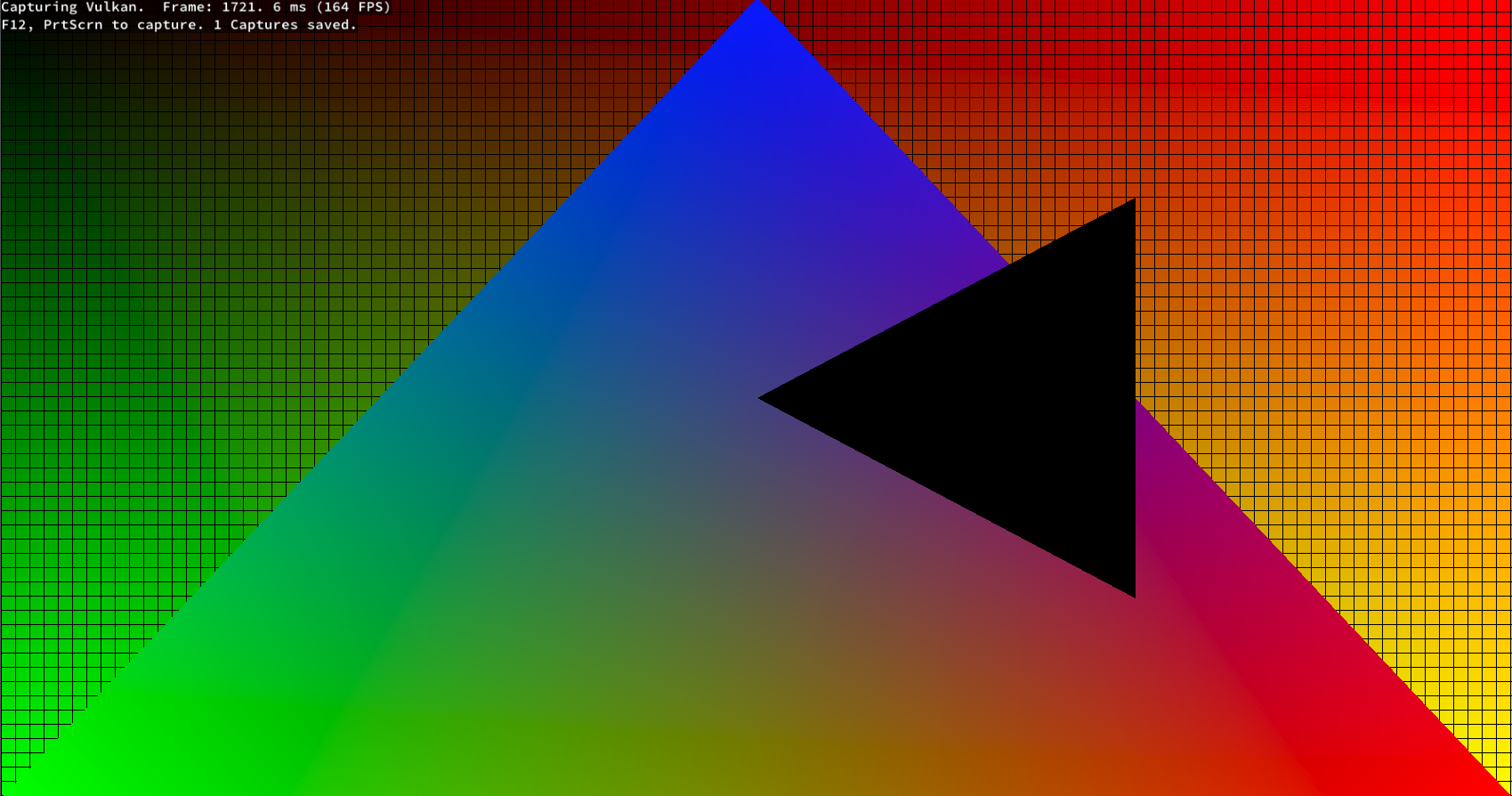
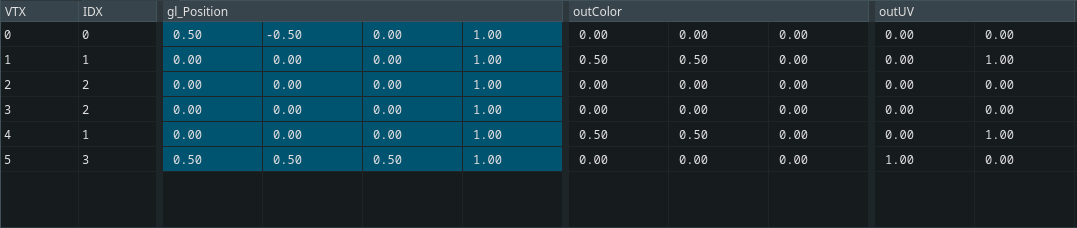
And if I check the vertex data in renderdoc the data is wrong:

After that I add the extern keyword to the Vertex struct (To preserve the memory layout) and get:
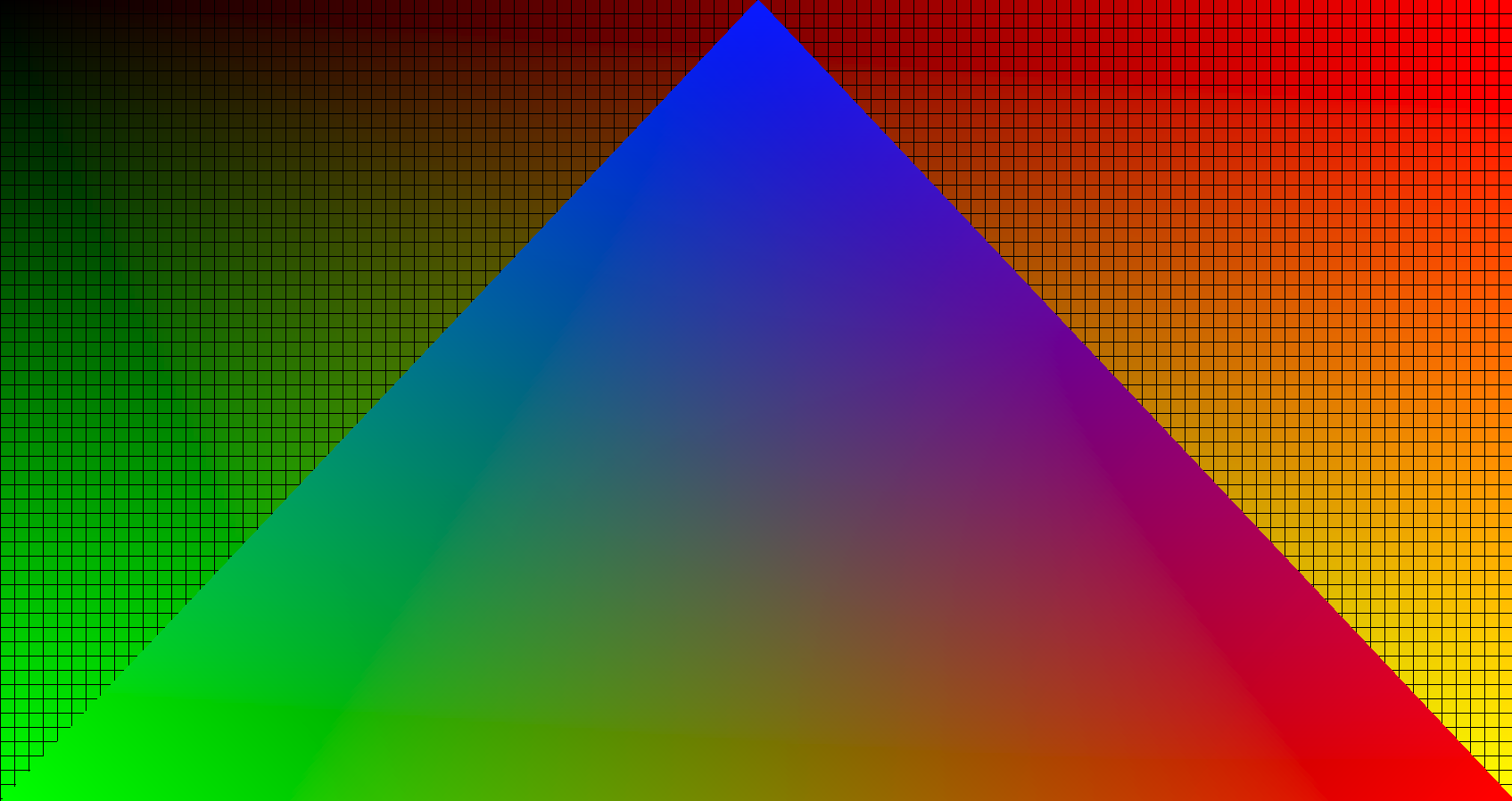

And now if I check the vertex data in rednerdoc I get:
Solution?

If I change the definition of Vertex to:

pub const Vertex = extern struct {
    position: [3]f32,
    uv_x: f32,
    normal: [3]f32,
    uv_y: f32,
    color: [4]f32,
};

Then I get:
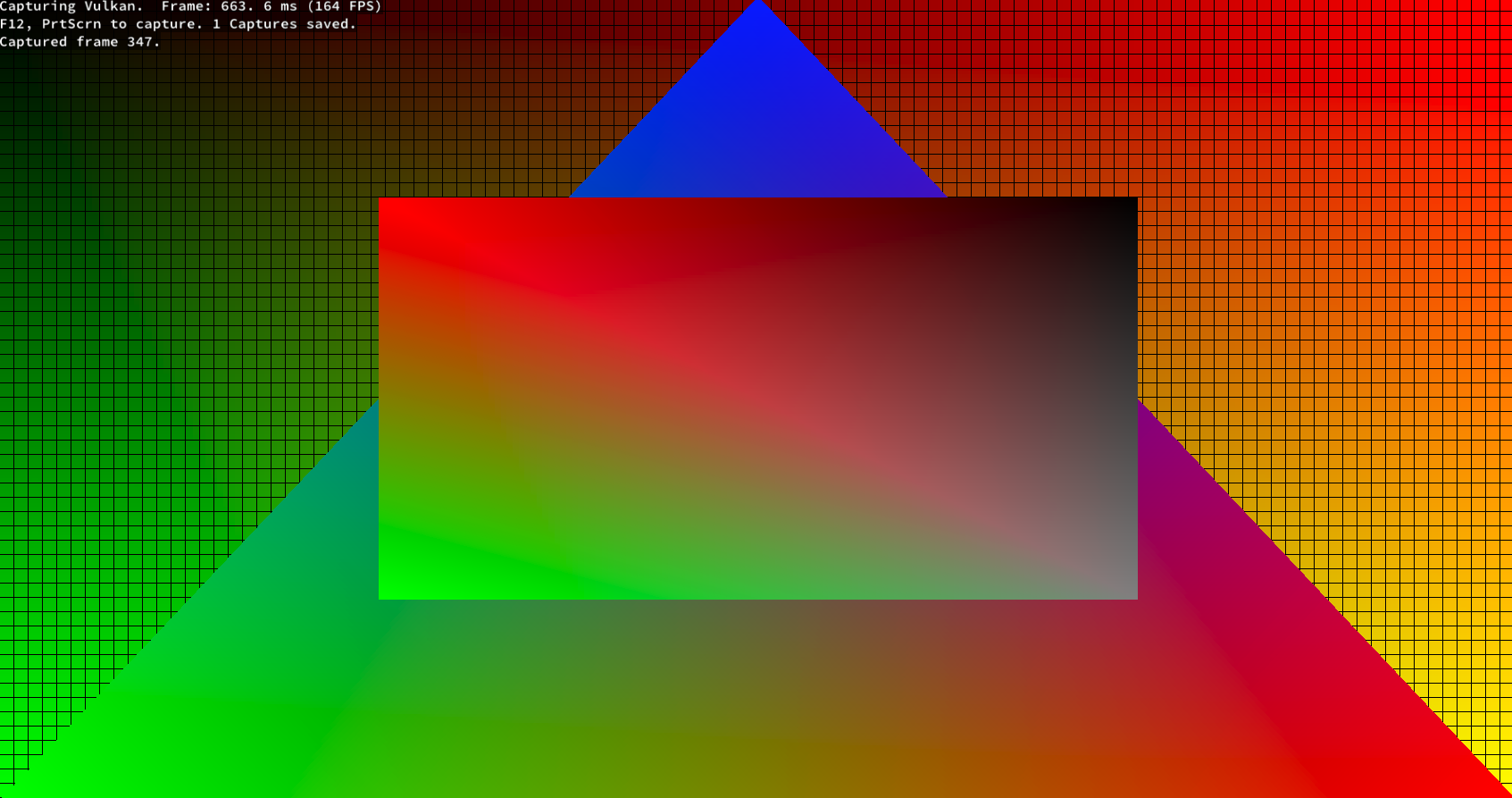

And the data in renderdoc now looks ok:

Question

Why is all this happening? Shouldn’t @Vector(3, f32) and [3]f32 be the same in this case?

I also have a push constant declared as such:

pub const GPUDrawPushConstants = extern struct {
    world_matrix: [4]@Vector(4, f32),
    vertex_buffer: vk.DeviceAddress,
};

And looks ok in renderdoc:

2 Likes

Note this section of the langref.

Also the size of simd vectors usually is a power of two. Because of this a @Vector(3, f32) is most likely to be the same as a @Vector(4, f32) where one element is unused:

comptime {
    @compileLog(@sizeOf(@Vector(3, f32)));
    @compileLog(@sizeOf([3]f32));
}
Compile Log Output:
@as(comptime_int, 16)
@as(comptime_int, 12)
4 Likes

Missed that part of the documentation…

This seems to be the case. Thank you!

From the tutorial you’re reading, note the line

layout(buffer_reference, std430) readonly buffer VertexBuffer{ 

See the std430? Those are the layout rules for how vulkan is going to be reading your memory. You should read those, and make sure the layout of your structs match that.

const std = @import("std");

pub fn main() void {
    tInfo(@Vector(3, f32));
    tInfo([3]f32);
    tInfo(@Vector(4, f32));
    tInfo([4]f32);
}

fn tInfo(T: type) void {
    std.debug.print("{s} is {d} bytes big and aligned to {d} bytes.\n", .{ @typeName(T), @sizeOf(T), @alignOf(T) });
}

prints

@Vector(3, f32) is 16 bytes big and aligned to 16 bytes.
[3]f32 is 12 bytes big and aligned to 4 bytes.
@Vector(4, f32) is 16 bytes big and aligned to 16 bytes.
[4]f32 is 16 bytes big and aligned to 4 bytes.

Vectors have alignment requirements, which creates a minimum size for that alignment. So the byte layout of the struct has padding on the Zig side and not of the graphics side.

Additionally, to explain why you needed extern: Zig reserves the right to do whatever it wants with the memory layout of normal structs. This means you need to never make assumptions about the layout. In practice, it orders fields to minimize padding needed for field alignment.

This can be fine, eg in opengl if you simply use @sizeOf and @alignOf when setting up your vertex attributes, but is problematic if the structs are also defined in your shader code.

3 Likes

Thank you!

This is very helpful.

It might be of interest to you that you have a lot more layout flexibility on Vulkan 1.4 or with VK_EXT_scalar_block_layout.

Description

This extension enables C-like structure layout for SPIR-V blocks. It modifies the alignment rules for uniform buffers, storage buffers and push constants, allowing non-scalar types to be aligned solely based on the size of their components, without additional requirements.

Promotion to Vulkan 1.2

Vulkan APIs in this extension are included in core Vulkan 1.2, with the EXT suffix omitted. However, if Vulkan 1.2 is supported and this extension is not, the scalarBlockLayout capability is optional. External interactions defined by this extension, such as SPIR-V token names, retain their original names. The original Vulkan API names are still available as aliases of the core functionality.

Promotion to Vulkan 1.4

If Vulkan 1.4 is supported, support for the scalarBlockLayout capability is required.

1 Like

Congratulations getting stuff to the screen in Vulkan in Zig. Getting the boilerplate running is always a feat.

While the memory model has been properly pointed out as the issue, a couple of comments:

  1. I know that you are running through tutorials, but DX12 and Vulkan are converging on Slang for shaders. The old GLSL stuff is missing a LOT of the modern functionality. So, you are learning a bunch of quirks that aren’t relevant anymore. And one of the areas in particular that has received attention is memory packing.

  2. @Vector(3, f32) will cause endless amounts of grief because of both packing and alignment. You should almost always use @Vector(4, f32) and just eat the “waste” if you can’t use it. Until you are slinging gazillions of polygons, it’s just not worth the grief in order to save 4 bytes (and, even then, you’ll have to run a profiler to make sure it doesn’t scramble your memory bandwidth somehow).

  3. “Render passes” aren’t out-of-date on Vulkan. They work just fine and are necessary even on modern Android GPUs. However, the problem is that they cause a bunch of complexity issues in your code and only gain when used on a tiling GPU (aka only on Android). Consequently, the desktop space has effectively converged to using “dynamic rendering”.

1 Like

Oh this is great news!

My plan was to follow the tutorial until completion and keep the repository as is for future additions to the vulkan guide.

But then make a separate repository and see what else vulkan has to offer and I just wrote this down as I woul like to look into it then.

Thank you for the information.

Oh this is very interesting,

The boilerplate wasn’t actually that bad I just had to write a wrapper for the Vulkan Memory Allocator the rest was pretty easy. A gpu compatible math library for zig would be nice (If I didn’t miss an already existing one that is…)

  1. I saw the announcement for Slang’s release and looked a little into it but I don’t really know shader programming, but I plan to look into a tutorial and I will try to follow it along in slang if I can.
  2. Yeah I was a bit stingy here cause being new to gpu programming I don’t really know how much leeway I have with performance but it seems there is quite a lot for simple stuff.
  3. I know that render passes are still used but I have no interest in mobile only desktop and since I saw a an article recommend it for desktop I stuck to it.

Thank you for this I will keep this info in mind.