Tennis - stylish tables in your terminal (0.4)

Tennis is a cli tool that prints stylish tables in your terminal. You point it at csv, json or even a sqlite file and it renders a nice table. Project is still very young, I pushed out 0.4 earlier today.

This is my first Zig project and I am loving it so far. You may recall my post-mortem post here a few days ago… Still enjoying zig, using 0.15.2 at the moment.

I picked zig because I want tiny binaries and I fell in love with the fast compilation. I am having excellent luck pairing with codex. The LLMs add features very quickly, but it takes a senior engineer to keep it idiomatic and maintainable.
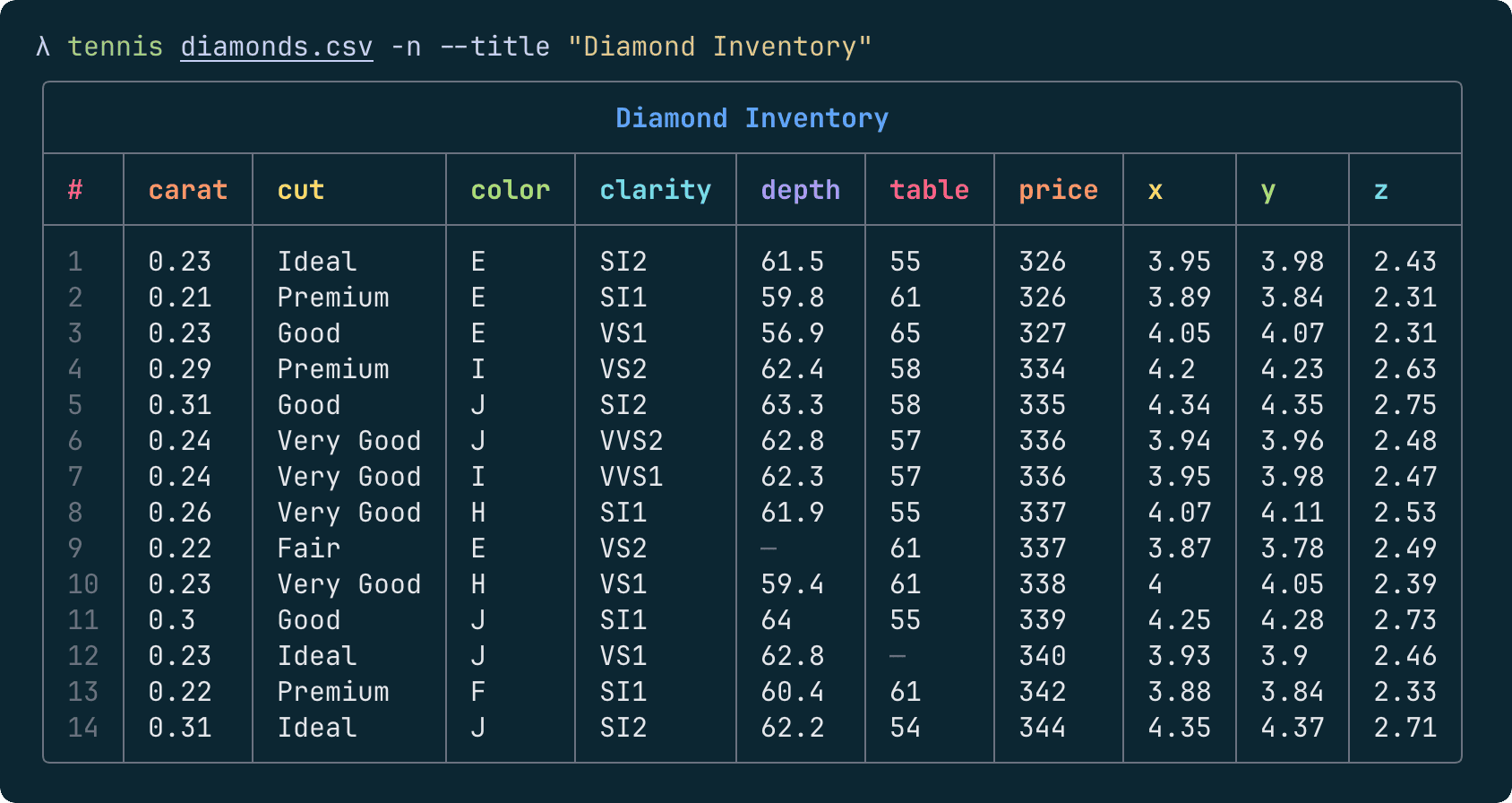
$ tennis --help

Usage: tennis [options...] <file.csv>
        also supports stdin, json/jsonl, sqlite, etc.

 Popular options:
  -n, --row-numbers          Turn on row numbers
  -t, --title <string>       Add a title to the table
      --border <border>      Table border style (rounded|thin|double|...)
  -p, --pager                Send output through $PAGER or less
      --peek                 Show csv shape, sample, and handy stats
      --zebra                Turn on zebra stripes

 Sort, filter, etc:
      --deselect <headers>   De-select comma-separated headers
      --select <headers>     Select or reorder comma-separated headers
      --sort <headers>       Sort rows by comma-separated headers
  -r, --reverse              Reverse rows (helpful for sorting)
      --shuffle, --shuf      Shuffle rows into random order
      --head <int>           Show first N rows
      --tail <int>           Show last N rows
      --filter <string>      Only show rows that contain this text

 Other options:
      --color <color>        Turn color off and on (on|off|auto)
      --delimiter <char>     Set CSV delim (can be any char or "tab")
      --digits <int>         Digits after decimal for float columns
      --table <table>        Select the db table (for sqlite)
      --theme <theme>        Select color theme (auto|dark|light)
      --vanilla              Disable numeric formatting
      --width <width>        Set table width, or try (min|max)

      --completion <shell>   Print shell completion (bash|zsh)
      --help                 Get help
      --version              Show version number and exit
11 Likes

That’s pretty, I will run this. Do you plan to support a .config for theming? Looking at your dark mode I probably wouldn’t bother, curiosity more than anything.

Calculating non-ASCII display width can be complicated, so tennis includes simple heuristics for common cases.

You could do better than heuristics (I maintain this), linked to a release because the trunk branch is not what you’d want. There’s uucode as well, which gets you the same answer as Ghostty by construction. For zg it’s just by policy.

Glad you like it!

That’s pretty, I will run this. Do you plan to support a .config for theming? Looking at your dark mode I probably wouldn’t bother, curiosity more than anything.

I’ve given it serious, serious thought. Do you think it would be overkill for this little project? I’ve also considered a magic env like $TENNIS_OPTIONS for specifying args. Or $TENNIS_CONFIG_PATH, like ripgrep. Right now I personally use an alias to turn on --pager, which I pretty much always want.

You could do better than heuristics (I maintain this), linked to a release because the trunk branch is not what you’d want. There’s uucode as well, which gets you the same answer as Ghostty by construction. For zg it’s just by policy.

Q: any hint on build size? One of my favorite things about tennis is the tiny binary size. An 80% solution that’’s a few lines of code might be a better fit. I suppose I could just try ‘em. Maybe when 0.16 is officially out.

More feature requests feedback welcome. Fun project and I’m still quite new to zig.

Data is about 36KiB for graphemes:

s1 len 4352 (u16) s2 len 27136 (u7) s3 len 18 (u8) total bytes 35858

Suspiciously similar for displaywidth itself, 36KiB:

s1 len 4352 (u16) s2 len 27136 (i4, oddly enough) total bytes 35840

There are reasons these numbers look like they do. Code is more of course, but not all that much.

The way I see it, there’s scope, and there’s polish. Scope creep is bad, polish is always good. Best applied at a pace which stays fun and engaging.

So no, not overkill. We’ve got Loris Cro’s Ziggy for Zig-native config, less INI-file-like than the most typical approach for config, but very well done in my view. Beats the pants off JSON.

And just in the interest of sharing, rather than a suggestion that you’d use it (of course you may), I wrote obelizmo, in the spirit of ‘small tools which do one thing well’. Hopefully well.