I’m trying to diagnose a build that keep getting terminated (presumably by the OS, on macOS) because it spins at 100% for almost 5 minutes before failing (“terminated unexpectedly”). This is the first time I’ve built the tool on macOS since adding a dependency (that I “wrote”) that includes generated code, so I suspect that the generated code is the culprit.
I’m working on a tool that encodes some data into the Perfetto protobuf schema. I’ve used gremlin.zig to generate Zig code for this protobuf schema (repo for the generated code), and it turns out to be an enormous amount of Zig code, like 532k lines.
I’ve tried only exposing the handful of types that I need (this file), but because those types sit near the “root” of the tree of types, I think a good chunk of the generated code is still “referenced” and therefore compiled.
I’m wondering if anyone has any suggestions on how to address this, or if anyone has suggestions for how to check that this actually is the source of my failing build.
“terminated unexpectedly” usually means OOM on macos, you can check if there’s any more information in Console.app → Crash Reports.
You can also try passing --time-report to zig build to get some more insights into the build process.
Unfortunately the build never finishes, so --time-report only tells me that the options phase takes 20us. While I appreciate that this phase is fast, that’s not terribly helpful
I haven’t found anything about Zig specifically in Console.app, but I see some other processes getting terminated due to jetsam, which is apparently the equivalent of the OOM killer on macOS. So I’m medium-confident that it is actually an OOM situation.
I’m more concerned with reducing the amount of code that gets compiled. Unless anyone has other suggestions, I think the way forward is to literally just make copies of the generated code that I need and strip out the fields that I’m not using (they’re all optional anyway). This obviously doesn’t scale, but I’m not really sure what else to do at the moment.
Honestly, 500k LOC is a lot but not out of scope of the Zig compiler - the Zig codebase itself is ~1.2 million LOC (of Zig code) so I don’t think that the amount of code is the primary issue here unless the generated code is doing some crazy comptime computations
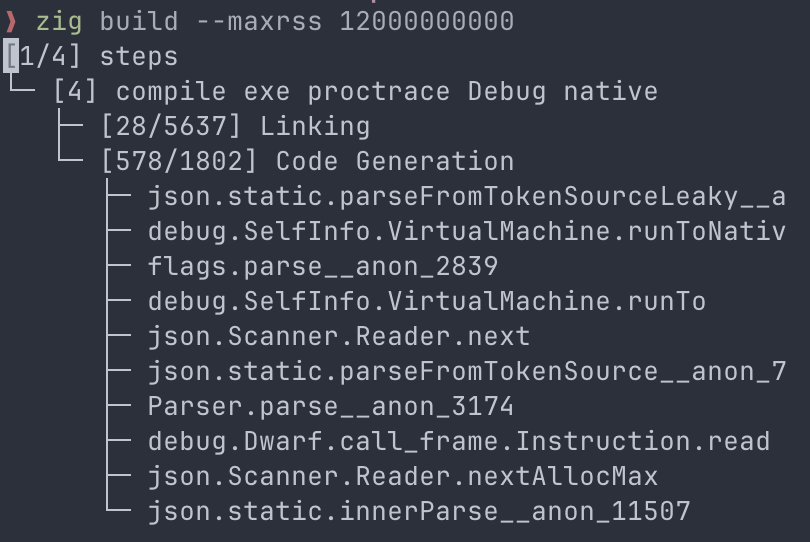
Hm, so zig build check succeeds pretty much instantly, it’s only zig build install (run as the zig build default) that starts to chew through CPU. I’m trying the --maxrss flag set to ~12GB to see if I can at least get the build to succeed without getting OOM-killed. I’ve attached a screenshot of where it seems to hang:
I did some bisecting, and I tracked it down to this:
const exe = ctx.b.addExecutable(.{
    // zig fmt: off
    .name = exe_name,
    .root_module = exe_mod,
    .use_llvm = use_llvm_opt, // <--- fails when this is false
    // zig fmt: on
});
What’s confusing about this is that on macOS it should be using the LLVM backend anyway since there’s no self-hosted backend for macOS yet (as far as I know).
I think what happened here is that I made an option for use_llvm to make it easier to use lldb, but I defaulted it to false instead of null, so when I leave this unset it sets use_llvm to false instead of letting it use the default via null.
You are correct, the custom backends are available to use even if they are not good enough to be the default. null says “do whatever the default is”, false is saying “dont use llvm”, which leaves only the wip custom backend to be used.