Quark - GUI toolkit made for Zig focused on simplicity

,

GUI toolkit made for Zig focused on simplicity

That tagline is soo gonna change in the future.

Quark is a Vulkan-based GUI toolkit framework designed for those who needs a UI that’s nice and simple—visually and in code without the extra overhead other frameworks has.

This isn’t my first time trying to do a project related allowing people to create GUI *, but this one is the one I’m most proud of. There’s still some bugs and all, I’m fixing some of them right now and overall making the usage of coding with Quark easier for everybody in the process.

Quark is a hybrid GUI—between retained and immediate mode, because I want the best of both worlds :). So far—there’s two application that uses Quark as it’s GUI framework—in which, both of them are mine. Both of which is currently rswlsr (the one i’m working on currently) and Cazic.

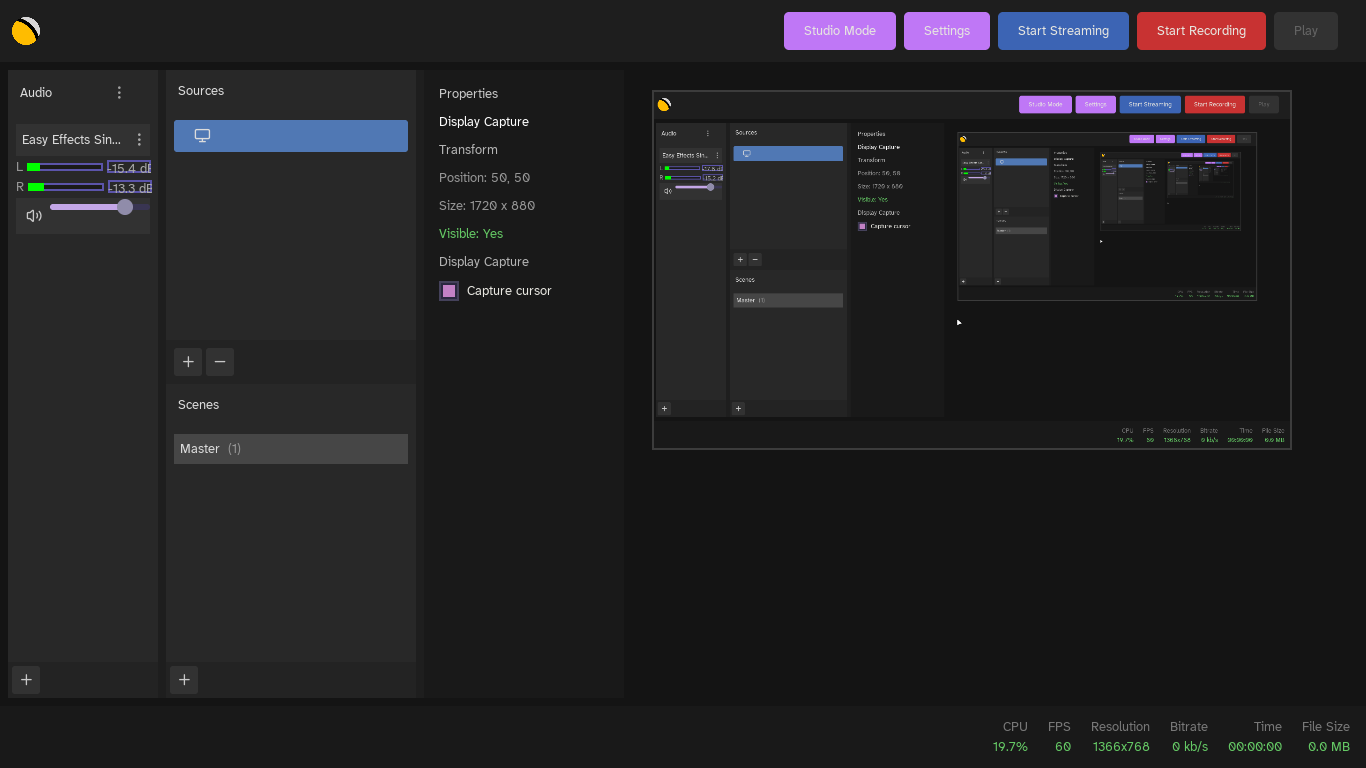
Here’s a working-in-progress image of rswlsr, a really simple wayland screen recoderer:
Quark currently has about 15 widgets (I’m not gonna recount, my podcast is more important) ranging from a simple Button and Text to Image and Canvas.

I’m open to criticism—I want this project to get better and better overtime, not a burden for people developing their application with it. So anything you like, love, or hate about this project—please tell me about it.
Any bug fixes or issues would really be appreciated as well.

I don’t know what else to say really, I hope I’ve said enough. This is my first post overall and showcasing this library to the masses is something I’m kinda scared of, but you just gotta push through, huh?

Supported Zig versions

Right now—0.16.x.
It’ll always support the most up-to-date stable release of Zig as long this project exists. Support for older Zig versions aren’t in mind, right now at least.

AI / LLM usage disclosure

Claude was involved in creating the first “draft” of Quark (v4[r3])—which is about 6 months ago. It was somewhat encouraged that you could use AI for coding assistant or to impl something that’s on that big of a scale (take for example—300 lines of Vulkan) but starting two weeks ago, the usage of AI isn’t allowed anymore, as I’ve realised that yeha… AI isn’t a tool you must depend on all the time.—And AI just can’t code to save it’s life unless it’s web slop.

This project isn’t “vibe-coded” or anything, I build on top of what was there in the first draft.

5 Likes

As a marketing tip, I think you should put an image on the readme of a sample program using the gui. When people hear about a gui, the first thing people expect to see is the gui.

6 Likes

True true—there needs to be a showcase image, thanks for the info! :0
They are images in the examples/ folder but they aren’t “worthy” of being displayed on the main README.md

2 Likes

Whenever I hear about a new “GUI” toolkit, my immediate questions are about:

  • What platforms are supported and tested?
  • What’s the paradigm (retained, immediate, mixed)?
  • What does it look like? Show pictures.
  • What widgets do you support? Show pictures.
  • What human interface input devices do you support? (touch, pen, IME, …)
  • Text? (Unicode, BIDI, font linking, editing, rich text)
  • Internationalization?
  • Accessibility?
  • Performance, memory usage, and allocation strategy.
4 Likes

What platforms are supported and tested?

Just Linux right now, Wayland

What’s the paradigm

It’s a Hybrid

What does it look like?

You can look at the pictures available in the examples folder—Quark - GUI toolkit made for Zig focused on simplicity - #3 by xan. Other projects that are made with Quark are rswlsr and Cazic.


^ WIP version of rswlsr.

What widgets do you support?

you can check by going in the src/Widget/ folder.

What human interface input devices do you support?

Just KB and Mouse

Text? (Unicode, BIDI, font linking, editing, rich text)

via FreeType2. no BIDI, Rich Text is a widget in Quark

Internationalization?

No i18n, I’m the only one working on this library right now and I only speak English.

Accessibility?

Not planned right now, this GUI toolkit is still small and there’s other things to do right now than doing accessibility.

Performance, memory usage, and allocation strategy.

There’s text width caching, texture caching, like—performance is a number one priority for Quark.

2 Likes

some of these questions should be answered either in the top post here or in the README of your repo.

yeha—you’re right. I’m still working on the docs and all so no time soon I’ll post them in the repo.

Since you said you are open to (constructive) criticism:

Based on your examples, it looks like you handle event dispatch via assigning integer id’s to widgets. While this avoids the classic callback hell of something like Qt, I don’t think it would be particularly maintainable for a project with hundreds to thousands of widgets. I believe dvui uses the source location builtin to generate an id, which is more maintainable, but I am not sure if that would work with your design.

The “hybrid” retained mode and immediate mode API also feels rather primitive; like I am programming against a basic 2D renderer. What makes immediate mode APIs great is that rendering and logic is localized, but you have this weird split where the event loop is separate from the layout and view logic, while it still feels like immediate mode “layout”.

Also, I wouldn’t make claims like “low overhead compared to other frameworks” unless you actually went and measured it. It frankly makes me take your code not that seriously, but today I am feeling charitable.

My advice would be to commit to one style. The separate event loop and view feels more similar to something like Elm architectures. Those improve the ergonomics via message passing which is more general than event handlers.

3 Likes