New to Zig, and systems programming. What am I doing wrong here?

Hey Everyone,

I am an “AI” Engineer (AI tooling). Most of my experience is in Python, and Typescript. Looking to escape web dev hell so I am learning zig! I have done all of this without AI pretty much which is a pretty big deal for me. I just started this project and learning zig yesterday so please bare with me!

Anyways, here’s my issue.

const std = @import("std");
const Io = std.Io;

const Gratitude = struct {
    reason: []u8,
};

pub fn main(init: std.process.Init) !void {
    var stdout_buffer: [1024]u8 = undefined;
    var stdout_writer = Io.File.stdout().writer(init.io, &stdout_buffer);
    const stdout: *std.Io.Writer = &stdout_writer.interface;

    var stdin_buffer: [1024]u8 = undefined;
    var stdin_reader = Io.File.stdin().reader(init.io, &stdin_buffer);
    const stdin: *std.Io.Reader = &stdin_reader.interface;

    try stdout.print("What are you grateful for?\n", .{});
    try stdout.flush();
    // 1, declare a 5 item array.
    // 2, loop through said array until it has 5 items.
    // 3, after user input, append the string to the array
    // 4, once the length is 5, stop the loop.
    //
    var i: u8 = 1;
    const allocator = std.heap.page_allocator;
    var list_of_gratitudes: std.ArrayList([]const u8) = .empty;
    defer list_of_gratitudes.deinit(allocator);
    while (i <= 5) : (i += 1) {
        try stdout.print("{d}: ", .{i});
        try stdout.flush();
        const raw_line = try stdin.takeDelimiter('\n') orelse unreachable;
        const line = std.mem.trim(u8, raw_line, "\r");
        try list_of_gratitudes.append(allocator, line);
    }
    for (list_of_gratitudes.items, 0..) |gratitude_string, index| {
        try stdout.print("{d}: {s}\n", .{ index + 1, gratitude_string });
        try stdout.flush();
    }
    try stdout.print("{s}\n", .{"Thank you, Have a nice day!"});
    try stdout.flush();
}

When I enter 5 different strings:

What are you grateful for?
1: My keyboard
2: My daughter
3: My Wife
4: My Family
5: Zig
1: Zig
amily
r
2: Zig
amily
r
3: Zig
ami
4: Zig
amily
5: Zig
Thank you, Have a nice day!

As you can see the output is garbled. I have tried to use stdin.discardRemaining() and this leads to the loop not executing properly (it infinitely hangs). I have also tried using stdin.toss(1) (I don’t exactly understand what this does but anyways). I have a feeling that stdin is keeping old characters in it’s reader when I go to read the next user input which is what’s leading to this garbled output. Anyways, thank you all for your help and I hope this was enough context!

Will
The take functions on the reader return slices into the interface buffer, the one you provide when creating the reader, and they mark that portion of the buffer as reusable.
So when the reader needs more space in the buffer it will go back and reuse the parts of the buffer you, by using a take function, said it could.

What you need is stable memory that lives longer than between each read. There are a number ways you could do this, try them all to get a feel for their pros and cons:

  • Just assert that the total length read is <= the interface buffer, and make said buffer large enough for the data you need.
  • allocate each line individually
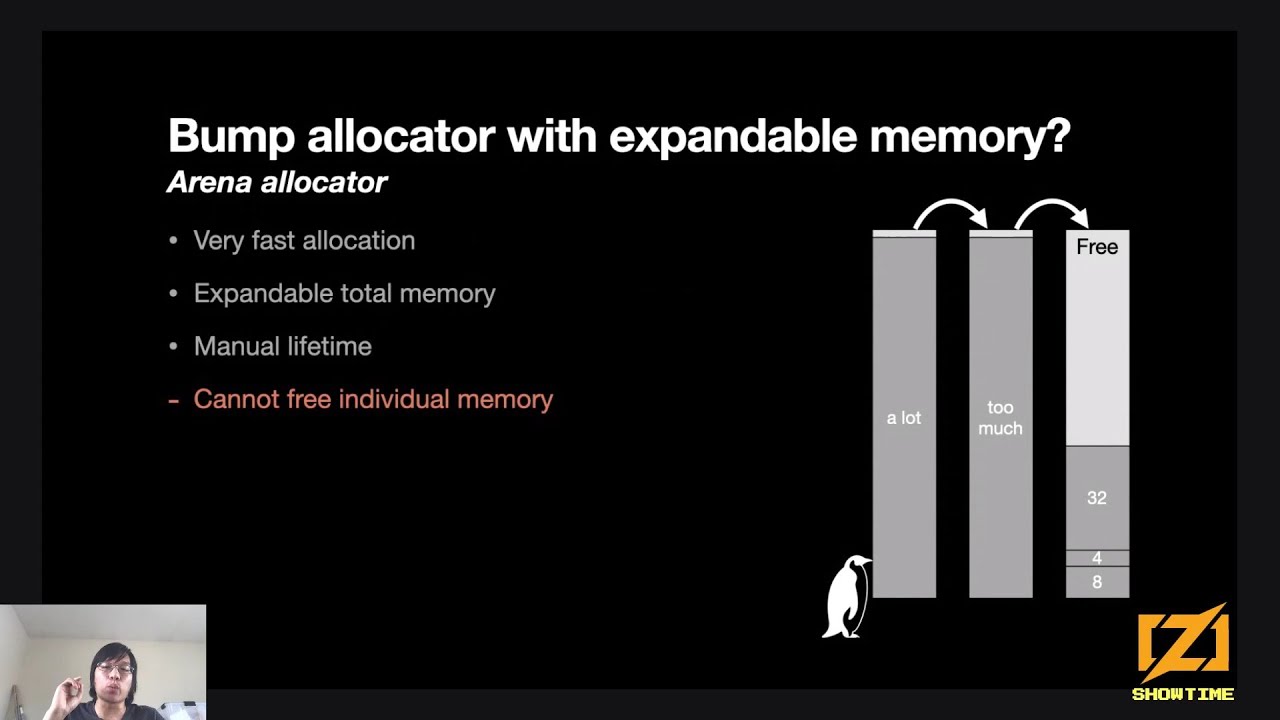
  • ^ above, but using an arena allocator
  • You could have another array list that you append each line to (be aware that it can move its memory around, so you’ll need a different way to refer to each line)
  • (if you were reading a normal file, instead of standard input) you could allocate the whole file contents before parsing it.

Thank you! I will try all this stuff out.

Any materials you would recommend for understanding allocators?

I would actually recommend not deeply understanding allocators for now. The details are certainly interesting, but will come easier once you’re more comfortable working with memory as memory.

The main thing to think about is that an allocator gives you the ability to work with ranges of memory of arbitrary or runtime-known size, but in exchange, reserving and releasing that memory becomes (in Zig) the responsibility of the programmer.

(In fact, in Zig, allocators are basically the only way to work with an amount of memory not known at compile time. This is a very useful limitation, although you’ve hit one of the places where it itches in your program above.)

If you want a quick garden tour of std’s allocator, I recommend Allocators | zig.guide.

Note that functions always receive type erased (think interface) allocator, so they always respect the contract of the allocator (i.e. free what you own when you’re done with it), but keep in mind that behavior of allocator are at the discretion of implementation, e.g. Arena’s free will be a no-op unless it is freeing the latest allocation, fixed buffer allocator will error when out of memory, while other allocators will ask the OS for more memory.

My learning recommendation is to use what seems the simplest to you. When you hit a wall, explore your options and the nuance will make sense.

Obligatory Ziglings mention, in case you haven’t seen it yet!

https://codeberg.org/ziglings/exercises/#ziglings

Hoping this helps you:

About allocators :

I agree there is no need to care too much about details (yet) if you are beginning, but wanted to share this video :

For me it was a pivotal piece of explanation. Maybe it clicks for you as well…

This is actually quite complicated to explain:

  • When you append to an ArrayList, the value you append is allocated
  • If the value you append to an ArrayList is a pointer or slice, the pointer/slice itself is what’s being allocated, not the memory it points to
  • When you call stdin.takeDelimiter(), the memory returned is guaranteed to be valid until the next time a take* function is called, but will often become undefined after one is called
  • When you append the returned memory from takeDelimiter() to your ArrayList([]const u8), what the ArrayList() holds is a pointer to memory that will later become undefined
  • This can be fixed by using std.mem.Allocator.dupe() on the memory returned by takeDelimiter(), transferring the ownership to the allocator - but it also means you’ll need to free it with the same allocator later

Here’s a complete working example:

const std = @import("std");
const Io = std.Io;

pub fn main(init: std.process.Init) !void {
	const alc = init.gpa;
	const io = init.io;

	var stdout_buffer: [1024]u8 = undefined;
	var stdout_writer = Io.File.stdout().writer(io, &stdout_buffer);
	const stdout: *std.Io.Writer = &stdout_writer.interface;

	var stdin_buffer: [1024]u8 = undefined;
	var stdin_reader = Io.File.stdin().reader(init.io, &stdin_buffer);
	const stdin: *std.Io.Reader = &stdin_reader.interface;

	try stdout.print("What are you grateful for?\n", .{});
	try stdout.flush();
	// 1, declare a 5 item array.
	// 2, loop through said array until it has 5 items.
	// 3, after user input, append the string to the array
	// 4, once the length is 5, stop the loop.
	//
	var list_of_gratitudes: std.ArrayList([]const u8) = .empty;
// Now that all the sub-strings held by list_of_gratitudes are allocated,
// we must ensure we loop over them and free them before deinitting the ArrayList().
defer{
	for(list_of_gratitudes.items) |substring| alc.free(substring);
	list_of_gratitudes.deinit(alc);
}

	for(0..5) |i| {
		try stdout.print("{d}: ", .{i});
		try stdout.flush();
		const raw_line = try stdin.takeDelimiter('\n') orelse unreachable;
		const line = std.mem.trim(u8, raw_line, "\r");
		// Duplicate the line so that it'll still be valid when we access it later.
		const line_dupe = try alc.dupe(u8, line);
		try list_of_gratitudes.append(alc, line_dupe);
	}
	for (list_of_gratitudes.items, 0..) |gratitude_string, index| {
		try stdout.print("{d}: {s}\n", .{index + 1, gratitude_string});
		try stdout.flush();
	}
	try stdout.print("{s}\n", .{"Thank you, Have a nice day!"});
	try stdout.flush();
}

And here it is, condensed down to just my additions:

var list_of_gratitudes: std.ArrayList([]const u8) = .empty;
// Now that all the sub-strings held by list_of_gratitudes are allocated,
// we must ensure we loop over them and free them before deinitting the ArrayList().
defer{
	for(list_of_gratitudes.items) |substring| alc.free(substring);
	list_of_gratitudes.deinit(alc);
}
// Duplicate the line so that it'll still be valid when we access it later.
const line_dupe = try alc.dupe(u8, line);
try list_of_gratitudes.append(alc, line_dupe);

This was really good, thanks for sharing this.

I like the answer from @tholmes that you’ve received. I wanted to add something that might help your understanding of what is happening in your version of the code though.

    ...
    while (i <= 5) : (i += 1) {
        try stdout.print("{d}: ", .{i});
        try stdout.flush();
        const raw_line = try stdin.takeDelimiter('\n') orelse unreachable;
        const line = std.mem.trim(u8, raw_line, "\r");
        // vvvv Print out the captured string with it's address vvvvv
        try stdout.print("Line -- {x}: {s}\n", .{ line, line });
        try list_of_gratitudes.append(allocator, line);
    }
    for (list_of_gratitudes.items, 0..) |gratitude_string, index| {
        // vvvv Print out the strings with their addresses vvvvv
        try stdout.print("{d}: {x} - {s}\n", .{ index + 1, gratitude_string, gratitude_string });
        try stdout.flush();
    }
    try stdout.print("{s}\n", .{"Thank you, Have a nice day!"});
    try stdout.flush();
}

What you should find, if you also print out the addresses of the strings, is that even though they initially have the right contents… they all have the same address. That’s why the alc.clone() call is necessary in the answer given. You need to move the contents out of the receiving buffer in to it’s own location, otherwise it gets overwritten when you capture the next string.

Then, in the defer block, because you’ve allocated a new location for each string stored in the arraylist(), you need to free() each one when you’re done with them.

The reason for the garbling of items 1-4, rather than them all just being “Zig”, is because slices aren’t just a memory address. They’re a memory address and a length. The lengths have been stored in the arraylist just fine, and when you come to print() you’re printing strings that are longer than just “Zig”. print() runs off the end of “Zig” and starts printing out old contents in the stdin_buffer. That’s still got "\n` characters in it and null bytes, so things go weird.

Thank you so much. Going to watch this now.

@tholmes Thank you for the explanation! So if I’m understanding things correctly, we are allocating a slice/pointer to the array list, that’s our valid clean string until there is new user input. When there is new user input, the previous input from the user is overwritten by the new one because the memory itself was not allocated but the pointer/slice was? Just want to make sure I’m understanding this correctly. If I’m understanding correctly your two changes allow the memory to be stable, and we add the pointer from the allocation result which is stable in memory because it has a separate storage place from the array list? And is not relying on the Stdin Buf

Thank you for sharing your background.

This is a very easy mistake to make if you are new to systems programming. Python and Typescript have automatic memory management, so they don’t have pointers. At least, not in the same way that languages such as C and Zig do.

Other people have explained what the problem is, and how to fix it, so I’ll focus more on some tricks you can use to debug this sort of problem in the future:


Figure out a variables type

The core problem is that you’ve misunderstood the type of these two variables. They are not string, because Zig does not have a fundamental ‘string’ type. What are they then?

const raw_line = try stdin.takeDelimiter('\n') orelse unreachable;
const line = std.mem.trim(u8, raw_line, "\r");

Hard to tell; they are inferred from the function call. You could look at the function declarations in the standard library to figure it out, but there is an easier method:

Add the following code:

@compileLog(raw_line);
@compileLog(line);

When you run zig build, it will fail with the following output:

Compile Log Output:
@as([]u8, [runtime value])
@as([]const u8, [runtime value])

To the left of the comma is the type of the variable, which is []u8 for raw_line and []const u8 for line - more on that later. To the right of the comma is the value it has at compile-time, or `[runtime value] if it isn’t known.

Now you can write down those types and remove the @compileLog() statements:

const raw_line: []u8 = try stdin.takeDelimiter('\n') orelse unreachable;
const line: []const u8 = std.mem.trim(u8, raw_line, "\r");

And it should build and run just like before.

You can use this on all sorts of things:

@compileLog(u8);
@compileLog([]u8);                                                      
@compileLog(Gratitude);
@compileLog(std);                                                          
@compileLog(allocator);
@compileLog(init);
@compileLog(init.gpa);

What is a []u8 anyway?

It’s a slice, explained in the documentation: Documentation - The Zig Programming Language

Slices have two fields: .ptr and a .len. May as well inspect them too:

@compileLog(line.ptr);
@compileLog(line.len);
Compile Log Output:
@as([*]const u8, [runtime value]))
@as(@as(usize, [runtime value])

That’s all a slice is. A many-item-pointer (with the same underlying type, const u8), and a usize.

You can confirm this by looking at the size of each type:

@compileLog(@sizeOf(@TypeOf(line)));                                       
@compileLog(@sizeOf(@TypeOf(line.ptr)));                                   
@compileLog(@sizeOf(@TypeOf(line.len)));

Assuming a 64-bit operating system:

Compile Log Output:
@as(comptime_int, 16)
@as(comptime_int, 8)

@sizeOf() evaluates at compile-time to the number of bytes required to store the given type. 8 bytes for the pointer, 8 bytes for the length, making a total of 16 bytes. You will get different results for a 32-bit system: try zig build -Dtarget=x86-linux-gnu.

Where are the bytes?

Question: If line is only 16 bytes large, how is it able to store strings that are much, much longer than 16 characters? Where are the bytes?

Answer: ‘somewhere else in memory’.

line.ptr tells you where ‘somewhere’ begins, and line.len can be used to infer where it ends.

If you want to see the value of line.ptr and line.len, you will need to print them at runtime. While you’re at it, print out the address of stdin_buffer too:

std.log.debug("&stdin_buffer=0x{x}", .{@intFromPtr(&stdin_buffer)});

std.log.debug("line.ptr=0x{x}, .len={}" , .{ @intFromPtr(line.ptr), line.len });

This will tell you were the bytes are.

Note: std.log.debug() is great for debugging. Among other things, the output will be hidden when you compile in ‘release’ mode e.g. zig build run -Doptimize=safe.

Print your strings in hexadecimal

When debugging code that deals with strings, it can be difficult to see what’s going on because of various newline, tab, or invisible characters. I recommend printing in hexadecimal instead by replacing the {s} with {x}: e.g.

try stdout.print("{d}: {x}\n", .{ index + 1, gratitude_string });

Doing this makes it much easier to see patterns in the output:

What are you grateful for?
1: My Keyboard
2: My Daughter
3: My Wife
4: My Family
5: Zig
1: 5a69670a616d696c790a72
2: 5a69670a616d696c790a72
3: 5a69670a616d69
4: 5a69670a616d696c79
5: 5a6967
Thank you, Have a nice day!

0x0a is the ASCII code for '\n', by the way.


I hope some of that makes it a little easier to learn Zig. :slight_smile:

Even better is to print with {q} in this case, which was released in 0.17 and prints escaped characters:

        try stdout.print("{d}: {q}\n", .{ index + 1, gratitude_string });

This results in:

What are you grateful for?
1: My Keyboard
2: My Daughter
3: My Wife
4: My Family
5: Zig
1: "Zig\namily\nr"
2: "Zig\namily\nr"
3: "Zig\nami"
4: "Zig\namily"
5: "Zig"
Thank you, Have a nice day!

Thank you so much for the rundown. Love this community, and the language itself!

You don’t need to understand “allocators” as such, just get first familiar with basic dynamic (heap) allocations. Instead of ‘new’ keyword like many other languages, in zig you pass allocator, and instead of pointers, zig has slices. Here is one example without any of Io stuff about copying things into memory:

test "extract substrings and store into list" {
    const allocator = std.testing.allocator;

    var list: std.ArrayList([]u8) = .empty;
    defer {
        for (list.items) |item| {
            allocator.free(item);
        }
        list.deinit(allocator);
    }

    const source_string: []const u8 = "123456789";

    // Manual memory management, allocate 3 bytes from heap and copy substring into it
    const numbers_234_in_heap = try allocator.alloc(u8, 3);
    @memcpy(numbers_234_in_heap[0..3], source_string[1..4]);

    // Same as above via dupe convenience function (size comes from slice)
    const numbers_678_in_heap = try allocator.dupe(u8, source_string[5..8]);
    // Defer-free not needed here, as allocated string(s) put into list that has child defer loop
    // defer alloc.free(numbers_234_in_heap);

    try list.append(allocator, numbers_234_in_heap);
    try list.append(allocator, numbers_678_in_heap);
    for (list.items) |item| {
        std.debug.print("{s}\n", .{item});
    }
}

Ps. My first comment to this forum. Hello everyone. New to zig, not to programming.

Zig has slices in addition to pointers, not instead of.

Memory leak right there!

You allocate numbers_234_in_heap and without storing it to list or having an errdefer you try the next allocation. If the second allocation fails you leak the first one.

You allocate numbers_678_in_heap and next line try list.append() which can fail. You leak both 234 and 678 there.

The last line can fail and leak 678.

You should ensure that you have enough capacity in the list first. Then allocate and immediately store in the list:

try list.ensureUnusedCapacity(allocator, 2);
const numbers_234_in_heap = try allocator.alloc(u8, 3);
list.appendAssumeCapacity(numbers_234_in_heap);
@memcpy(numbers_234_in_heap[0..3], source_string[1..4]);
const numbers_678_in_heap = try allocator.dupe(u8, source_string[5..8]);
list.appendAssumeCapacity(numbers_678_in_heap);