lui:
lui is a simple terminal file manager. Its main idea was building an interactive version of one of my most used Linux commands: ls -lah --group-directories-first.
https://codeberg.org/lukeflo/lui
While there are many fancy TUI file manager out there, I’ve tried most but found them bloated with features unnecessary to me. Thus, I just built my own one. Originally written in Rust called jafff I wanted to rewrite in in Zig, since I almost fully abandoned Rust, plus the Rust version is much slower.
And here it is! For now, only with very limited features. But it already serves as file picker for my Helix editor and as fast cd’ing tool. I will implement some more core features in the near future. However, if you’re looking for the next yazi, keep looking somewhere else 
Supported Zig versions
0.16
AI / LLM usage disclosure
I did not use any LLM for writing my code. Neither as agents, nor for prompting questions, ideas, reviews to a chat bot.
However, the only external dep I used for this program, libvaxis, is using some LLM support.
Quick impression
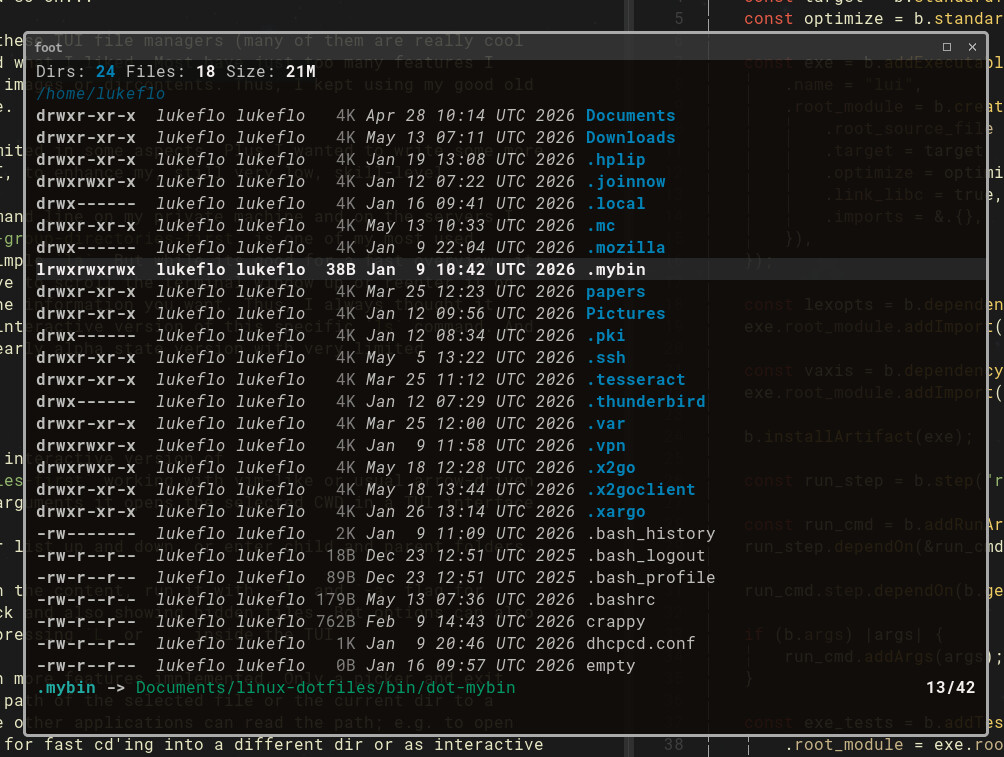
18 Likes
Great, exactly what I’m using when I run yazi. But there is an error with build.zig.zon, I opened an issue.
2 Likes
Yeah, thanks. I worked with local copies of the deps repos and forgot to replace them with the correct URLs. Will update this asap.
Updated the build.zig.zon file with the correct deps URLs and hashes. Should build now without problems. 
https://codeberg.org/lukeflo/lui/commit/11e9d6f5f0bbf1a6305339ad5afcd3d9e796e574
However, if you or anyone else find more errors, please report via issues. As said, its still very early and I for sure didn’t catch every error.
2 Likes
Staying busy improving lui I just implemented possibility to create files and dirs (as current user with default permissions), renaming items, as well as having feedback in form of simple status messages (success and error).
Its tested, but not in uncommon scenarios. Thus, if you find some comp/runtime panics, just tell me.
1 Like
Booya, in 0.3.0 just implemented a config .zon file which lets you define directories for fast selection.
Now, lui took over as my every day standard file manager TUI!
Just implemented some more little features:
- Use
X to fast toggle exec bit on files (like chmod +x|-x file)
- Open files with
l | -> | Return
- Set
file_opener in luiconfig.zon for files which should be opened in external programms via a default opener like xdg-open
- Set
tui_opener in luiconfig.zon to open plain text files with a terminal text editor (vim, helix, nano …) in the same terminal window that lui runs in; suspending the latter as long as the file is edited. tui_opener overrides file_opener for plain text files if both are set.
- Some minor fixes. Adding “keybindings” section to README.
Next feature implemented:
- Mark items for one of the operations: yank/copy
y / move m / delete d (toggles).
- Process action for all marked items with
P.
- Items that have been marked for yank/move will be yanked/moved to the currently opened directory.
- Items marked for deletion will either be deleted permanently, or, if the
.trash_folder path in the config file is set, moved to the trash folder.
- Unmark all items with
C.
All of these actions are processed with default setting like permissions etc. Its a nice and quick way for moving some files while in the TUI. However, for more complex file operations or if the files are critical ones, I highly recommend running these processes outside of lui
Just implemented optional git info. When lui is run with the -g/--git flag, it’ll provide a simple git info area at the top of the screen (when in a git root dir), printing current branch and changed/untracked files using git’s porcelain format version 1 specs (as explained in man git-status).
Thank you!
I noticed a bug though. If I try to enter the .git sub-directory I get this:
thread 2210581 panic: start index 3 is larger than end index 0
/home/jeremy/projects/zig/lui/src/git.zig:101:47: 0x121212a in getGitStatus (main.zig)
        break :blk try allocator.dupe(u8, line[3..end]);
                                              ^
/home/jeremy/projects/zig/lui/src/DirContent.zig:275:38: 0x121377f in buildGitInfo (main.zig)
    const git_info = git.getGitStatus(self.arena, self.io, self.dir) catch {
                                     ^
/home/jeremy/projects/zig/lui/src/DirList.zig:706:48: 0x12e39f1 in loadDir (main.zig)
    self.luitui.git_info = try dir.buildGitInfo();
                                               ^
/home/jeremy/projects/zig/lui/src/DirList.zig:528:29: 0x12e595c in enterDirOrOpen (main.zig)
            try self.loadDir(dir_to_load);
                            ^
/home/jeremy/projects/zig/lui/src/DirList.zig:156:40: 0x12efc70 in listEventHandler (main.zig)
                try self.enterDirOrOpen(ctx);
                                       ^
/home/jeremy/projects/zig/lui/src/LuiTui.zig:177:56: 0x12e2720 in typeErasedEventHandler (main.zig)
        .dir_list => try self.dir_list.listEventHandler(ctx, event),
                                                       ^
/home/jeremy/projects/zig/lui/zig-pkg/vaxis-0.6.0-BWNV_HHwCQCy33z_jb0RHLjoinqQ8tgQVZI9z2e5Yqdd/src/vxfw/vxfw.zig:287:26: 0x127add8 in handleEvent (main.zig)
            return handle(self.userdata, ctx, event);
                         ^
/home/jeremy/projects/zig/lui/zig-pkg/vaxis-0.6.0-BWNV_HHwCQCy33z_jb0RHLjoinqQ8tgQVZI9z2e5Yqdd/src/vxfw/App.zig:598:31: 0x128f229 in handleEvent (main.zig)
        try target.handleEvent(ctx, event);
                              ^
/home/jeremy/projects/zig/lui/zig-pkg/vaxis-0.6.0-BWNV_HHwCQCy33z_jb0RHLjoinqQ8tgQVZI9z2e5Yqdd/src/vxfw/App.zig:134:54: 0x12455ff in run (main.zig)
                        try focus_handler.handleEvent(&ctx, event);
                                                     ^
/home/jeremy/projects/zig/lui/src/main.zig:69:20: 0x121e555 in main (main.zig)
        try app.run(luitui.widget(), .{});
                   ^
/mnt/data/zig/0.16.0/lib/std/start.zig:737:30: 0x1220687 in callMain (std.zig)
    return wrapMain(root.main(.{
                             ^
../sysdeps/nptl/libc_start_call_main.h:58:16: 0x7a722662a1c9 in __libc_start_call_main (../sysdeps/x86/libc-start.c)
../csu/libc-start.c:360:3: 0x7a722662a28a in __libc_start_main_impl (../sysdeps/x86/libc-start.c)
???:?:?: 0x143dc94 in ??? (???)`
1 Like
Thanks for posting. Would you reopen it as issue in the repo? Thats easier for me tracking it 
Fixed with commit 7268ab07cfd0ccf