I just installed the windows 64 bit if zig and double clicked its icon. it shows me a quick something not sure what and disappears and nothing else happens. please help!
What happens if you run it from a terminal?
2 Likes
Zig isn’t GUI program, so if you double click an icon it runs in a console and exits immediately because there isn’t a Zig project to build in whatever folder is the current folder when the icon launches.
Zig must be run from a console/terminal. So, open Windows terminal, then type Zig at the prompt. If Zig has been installed properly you’ll see the Zig usage message printed to the console.
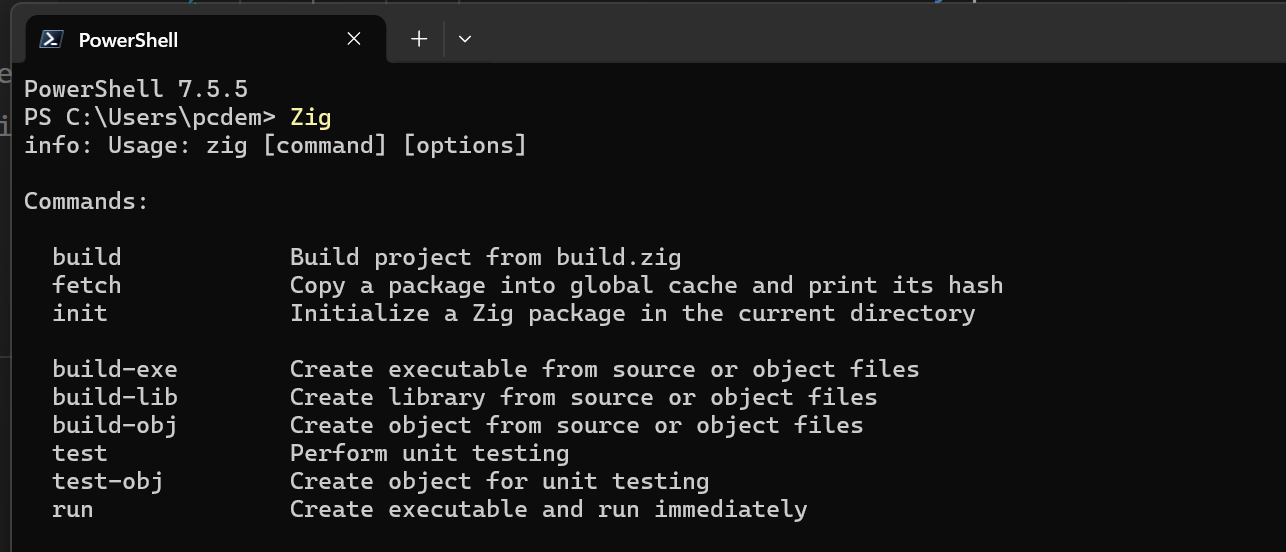
8 Likes
When I downloaded this it wasn’t and “installation” so can you tell me where these file go. Or point me to the right install? 
Edit: here is what my shell told me.
PowerShell 7.6.0
PS C:\Users\mysti> zig
zig: The term 'zig' is not recognized as a name of a cmdlet, function, script file, or executable program.
Check the spelling of the name, or if a path was included, verify that the path is correct and try again.
PS C:\Users\mysti>
any previous try search guidelines on internet or ai assist for installation? just curious. 
to run a program by name only, it must be included in the PATH environment variable.
to run a program not in your PATH, you just type the location of the executable, this can be relative to the prompts location.
you can lookup how to add it to your PATH, and how to type a file location. Among other basic things you should know when using a cmd prompt/terminal.
Not much help has been gotten because
- we don’t want to explain “basic” things you should ideally already know; most zig users were already experienced technical users before they ever heard of zig, so ironically they have less experience explaining the basics
- most of us don’t even use windows, as it tends to be a pain for technical usecases. Most use linux, or even mac. The few that do use windows do so with wsl, which is running linux under windows lol.
I’m sure there is an elusive BSD user as well.
2 Likes
I’m using mostly regular Windows just fine for my little Zig project.
But yes, one does need to learn basic things like terminal/command-prompts (many of the Linux folks use only terminals – no GUI at all), PATHs, manual installation of programs, and the like.
3 Likes
My guess is it went into your Downloads directory. Zig distribution is just the executable plus source files. You won’t get an MSI installer. you’ll need to move the files to somewhere on your PATH ( an environment variable that tells windows where to look for executable programs) or add it’s current location to your PATH variable.
In order to be of more help it will be helpful to know your experience with programming (what have you done, what tools have you used or are using). with that we can direct you to some more topics to learn about. Like some have said, a lot of us are so used to programming that we expect some level of share knowledge. it’s ok if you don’t have it, but it means that there’s other things we will need to point you towards before other stuff will make sense.
I say this not to chase you away, but to come to a shared understanding so that we can better help.
5 Likes
good guess Calder-Ty, i got it working now. I’ve programmed in many languages from Lisp, Fortran to COBOL..from c to c++ to Ada, To Pascal and object pascal, C#, vb, on from utilities to applications. I just of the existence if zig just now and was curious ti try itbecause it seems like very fast.