Help with MultiReader usage - Reading FFmpeg stdout/stderr progress not working

Hello everyone,

I’m new to Zig (only been learning for about a week) and have very little experience with systems programming or low-level programming. I have some basic programming knowledge but my understanding of IO is quite poor, so I might have fundamental misunderstandings about how things work here.

I’m trying to run an FFmpeg command from Zig and read its progress output in real-time. FFmpeg writes progress information to stdout when using the -progress pipe:1 flag, and errors to stderr. I found std.Io.File.MultiReader in the standard library which seemed perfect for reading both streams at the same time.

Here’s my code:

const std = @import("std");
const Io = std.Io;

pub fn main(init: std.process.Init) !void {
    const io = init.io;
    const allocator = init.arena.allocator();

    // ffmpeg -v error -skip_frame nokey -progress pipe:1 -i input.mp4 -vf "select='gt(scene,0.1)'" -vsync vfr -q:v 2 output-%04d.jpg
    const argv = &[_][]const u8{
        "ffmpeg",
        "-v",
        "error",
        "-skip_frame",
        "nokey",
        "-progress",
        "pipe:1",
        "-i",
        "input.mp4",
        "-vf",
        "\"select='gt(scene,0.1)'\"",
        "-fps_mode",
        "vfr",
        "-q:v",
        "2",
        "-y",
        "output-%04d.jpg",
    };

    var child = try std.process.spawn(io, .{ .argv = argv, .stdout = .pipe, .stderr = .pipe, .create_no_window = true });
    errdefer child.kill(io);

    var multi_reader_buffer: std.Io.File.MultiReader.Buffer(2) = undefined;
    var multi_reader: std.Io.File.MultiReader = undefined;
    multi_reader.init(allocator, io, multi_reader_buffer.toStreams(), &.{ child.stdout.?, child.stderr.? });
    defer multi_reader.deinit();

    const stdout_reader = multi_reader.reader(0);
    const stderr_reader = multi_reader.reader(1);

    while (true) {
        multi_reader.checkAnyError() catch |err| {
            std.debug.print("Error: {}", .{err});
            while (try stderr_reader.takeDelimiter('\n')) |err_line| {
                if (err_line.len > 0) {
                    std.debug.print("{s}\n", .{err_line});
                }
            }
            return err;
        };

        const maybe_line = try stdout_reader.takeDelimiter('\n');
        if (maybe_line) |line| {
            if (line.len != 0) {
                std.debug.print("{s}", .{line});
            }
        } else {
            std.debug.print("Print out all progress info", .{});
            break;
        }
    }

    _ = try child.wait(io);
}

My questions:

  1. Am I using MultiReader correctly? I’m not sure if I initialized it properly or if I’m using the readers the right way.

  2. Why does zig build run only output “Print out all progress info”? I never see any of the FFmpeg progress lines that should be coming from stdout. The FFmpeg command works fine when I run it directly in the terminal and produces the expected output files.

  3. Should I be using multiple threads for reading stdout and stderr simultaneously? I thought MultiReader would handle this for me, but maybe I’m misunderstanding its purpose.

  4. Is MultiReader the right tool for this job? If not, what’s the recommended way to read both stdout and stderr from a child process in Zig?

  5. How can I read all content from stderr at once? I want to be able to print all error messages if something goes wrong, even if they weren’t line-buffered properly.

I would really appreciate any help or guidance. Since I’m new to Zig and systems programming, simple explanations would be especially helpful. Thank you!
Your initialisation is fine. The purpose of it is to read multiple files without threads/async/concurrent.

The readers you get from it are just normal file readers, using them first defeats the point of using the multi reader. Instead, use multi_reader.fill, that will wait until either get data, but you have to check the buffer of each reader since it doesn’t tell you which.

checkAnyError checks to see if there was any error reading from either of the streams, it does not indicate that there was data in stderr. (IDK if you should call this during or after the loop?)

the reason you only got “print out all progress info”, is because initially the readers have a 0 len buffer (unless you call fill), which causes takeDelimiter to return null.

Based on your suggestions, I’ve updated my code as follows, and it works perfectly for what I need:

const std = @import("std");
const Io = std.Io;
const FillError = std.Io.File.MultiReader.FillError;

pub fn main(init: std.process.Init) !void {
    const io = init.io;
    const allocator = init.arena.allocator();

    // ffmpeg -v error -skip_frame nokey -progress pipe:1 -i input.mp4 -vf "select='gt(scene,0.1)'" -vsync vfr -q:v 2 output-%04d.jpg
    const argv = &[_][]const u8{
        "ffmpeg",
        "-v",
        "error",
        "-skip_frame",
        "nokey",
        "-progress",
        "pipe:1",
        "-i",
        "input.mp4",
        "-vf",
        "select='gt(scene\\,0.1)'",
        "-fps_mode",
        "vfr",
        "-q:v",
        "2",
        "-y",
        "output-%03d.jpg",
    };

    var child = try std.process.spawn(io, .{ .argv = argv, .stdout = .pipe, .stderr = .pipe, .create_no_window = true });
    errdefer child.kill(io);

    var multi_reader_buffer: std.Io.File.MultiReader.Buffer(2) = undefined;
    var multi_reader: std.Io.File.MultiReader = undefined;
    multi_reader.init(allocator, io, multi_reader_buffer.toStreams(), &.{ child.stdout.?, child.stderr.? });
    defer multi_reader.deinit();

    const stdout_reader = multi_reader.reader(0);
    const stderr_reader = multi_reader.reader(1);

    const buff_size = 1024;
    multi_reader.fill(buff_size, .{ .duration = .{ .raw = .fromSeconds(5), .clock = .real } }) catch |err| {
        switch (err) {
            FillError.EndOfStream => {},
            else => return err,
        }
    };

    if (stderr_reader.bufferedLen() != 0) {
        while (try stderr_reader.takeDelimiter('\n')) |line| {
            if (line.len != 0) {
                std.debug.print("{s}\n", .{line});
            }
        }
    } else {
        while (try stdout_reader.takeDelimiter('\n')) |line| {
            if (line.len != 0) {
                std.debug.print("{s}\n", .{line});
            }
        }
        std.debug.print("Print out all progress info", .{});
    }

    const term = try child.wait(io);

    if (term.exited != 0) {}
}

Obviously this is still very basic happy path code. I haven’t worked much with child processes and I/O yet, so my understanding is still quite superficial.

Thanks a lot for your help, I’ve learned a lot from this.

If you have a moment, could you take a quick look at the revised code and let me know if there are any major issues or Zig syntax improvements I might have missed?

You don’t need to specify the type for argv, &.{... should work.

I am not familiar with ffmpeg, but I assume it may write to stderr at any point, not just the beginning, in which case your logic is faulty.

while (multi_reader.fill(...)) {
    // process them...
    stderr.buffered();
    stdin.buffered();
} else |e| {...}

You can’t really use the reader api, as that may block to read more individually, though you may be fine with that.

FFmpeg writes to stderr at any time, and I’ve considered this point. With the way I handled it in a while loop before, I found that the program’s output was inconsistent with the output of directly running the FFmpeg command (it stopped after outputting nearly half of the information, which was not what I expected). I guess this might be related to the incorrect use of the Reader API you mentioned.

So I removed the loop. Although this fixed the incomplete output issue, it introduced a more critical problem: I can’t capture the errors that FFmpeg may output during processing.

Regarding your advice to avoid using the Reader API, do you mean APIs under the Reader like takeDelimiter? Then how should I read the content from stdout and stderr? Could you provide a slightly more detailed code example?

The buffered() function will give you all the buffered data that is available. Just be sure to call toss or tossBuffered to tell the reader it can reuse some or all the buffer.

So what is the essential difference between the combination of buffered and toss and takeDelimiter? Why is takeDelimiter not considered for use in this scenario?

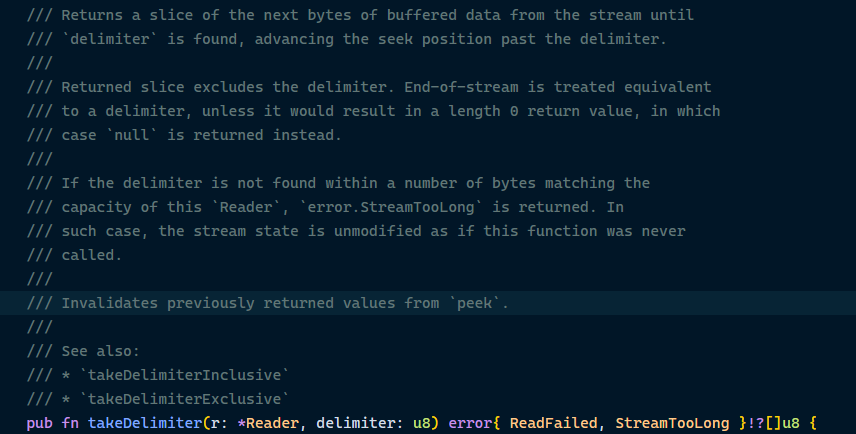
Because if the delimiter is not in the buffer, then it will try to read more data into the buffer (if there is space). You can ofc make the assumption that it will be, just be aware of it.

If I can confirm the buffer definitely contains the delimiter, is it acceptable to use takeDelimiter?

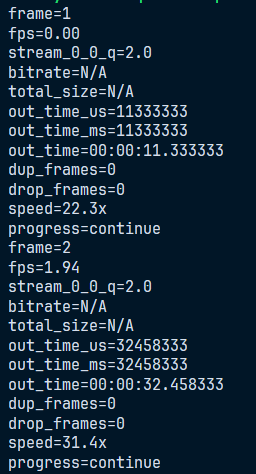
Actual FFmpeg output:

It is probably a safe assumption, I just want you to be aware of the assumption in case it ever causes you problems.

And even if the delimiter is not in the buffer, it might just be fine to block till it is..

Regardless you also have to deal with the event that the buffer isn’t large enough to contain the line, Ofc you can make the assumption that it always fits aswell.

I already knew these details from the std comments when using takeDelimiter, but thanks for your explanation anyway.

I just wondered why you advised against using this API, hence my question. Now I get it; you were highlighting the caveats of takeDelimiter usage.

1 Like